> ## Documentation Index
> Fetch the complete documentation index at: https://docs.bango.com/llms.txt
> Use this file to discover all available pages before exploring further.
# Migrating to the Bango DVM
> A practical guide to moving existing consumers onto the Bango DVM without disrupting service or sign-ups.
Use this guide to plan and execute a migration of existing subscription consumers onto the Digital Vending Machine® (Bango DVM™). It covers the complete journey from preparation and testing through controlled cutover, verification, and ongoing operation.
Migration brings existing subscriptions into the same DVM model used for new subscriptions. Consumers do not need to re-subscribe, and their current entitlement state can be preserved. The technical route changes underneath the consumer relationship.
If you are migrating an existing Netflix integration, [Migrating a Netflix integration to DVM](/guides/tutorials/migrating-netflix-to-dvm) covers the complete process with the Netflix-specific identity, product-mapping, validation, recovery, and cutover requirements.
## Why migrate
Direct subscription integrations usually grow one partnership at a time. Each new Content Provider can introduce another API, entitlement model, lifecycle implementation, support flow, and set of operational edge cases.
Bango DVM replaces those separate integration paths with a consistent model for Offers, Consumer Offers, entitlements, and subscription lifecycle management. A Reseller can consolidate Content Provider connections, and a Content Provider can consolidate Reseller connections.
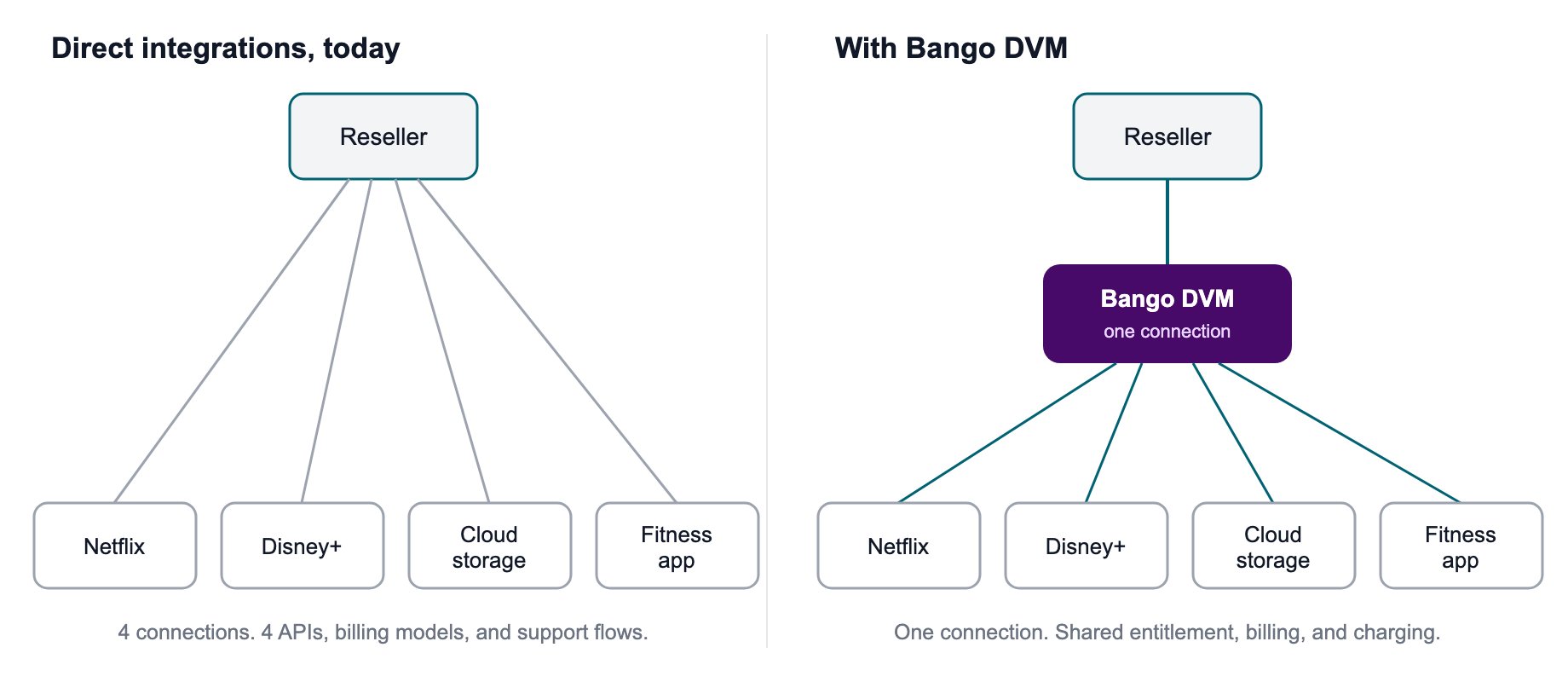 Migration moves the existing consumer base onto that model. New sign-ups can move to DVM on the same schedule or at a different point in the cutover plan.
## What migration changes
Migration creates the DVM records needed to manage an existing subscription without re-provisioning access that already exists at the Content Provider.
For each migrated subscription, DVM can establish:
* The current **Entitlement** state for each product the consumer can access.
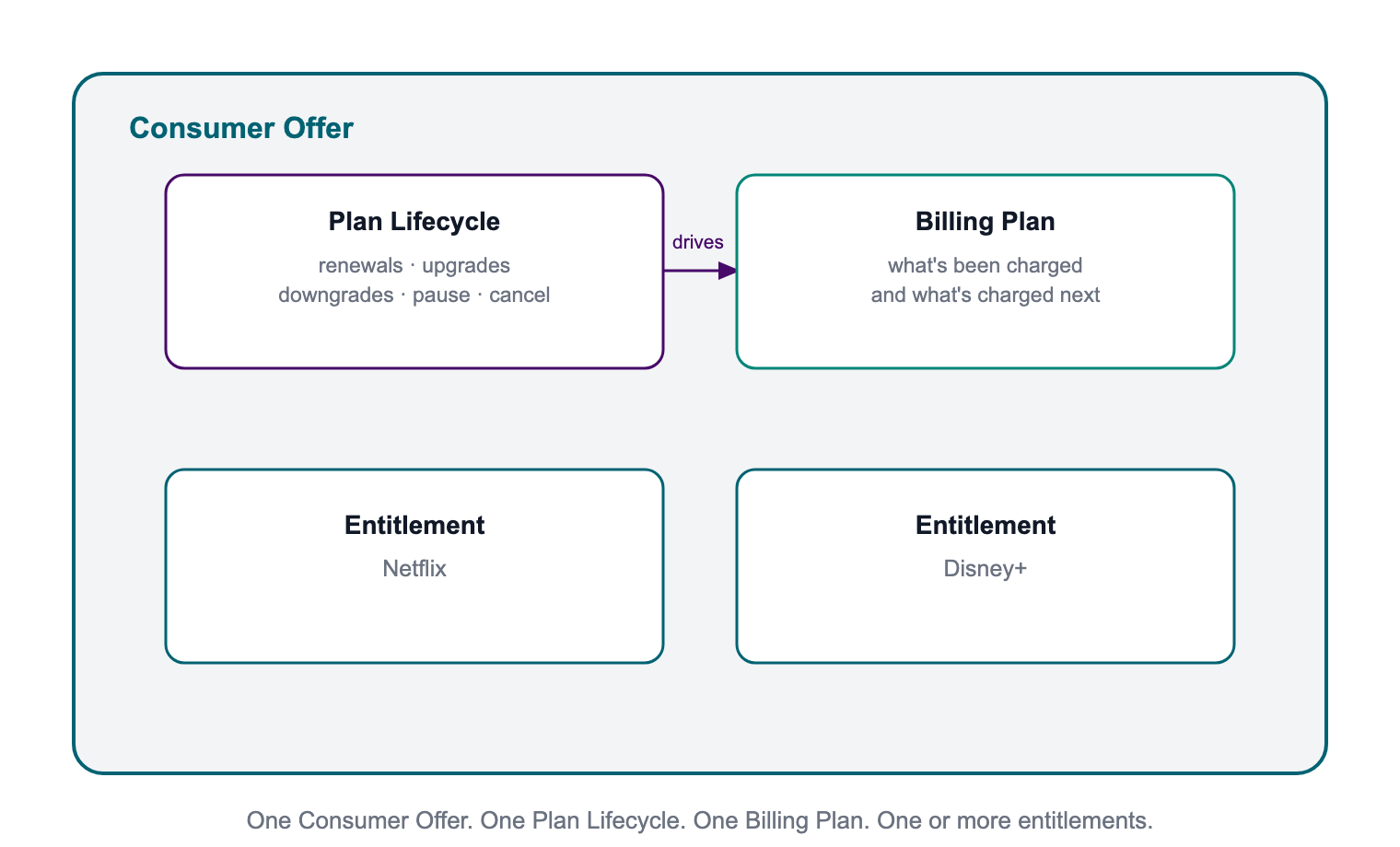
* The **Consumer Offer** that groups the entitlement or entitlements under the configured Offer.
* The **Plan Lifecycle** used to manage lifecycle behavior such as renewals, upgrades, downgrades, pauses, and cancellations.
* The **Billing Plan** associated with that lifecycle.
DVM Billing & Charging is optional. Creating the Consumer Offer, Plan Lifecycle, and Billing Plan does not require you to move consumer charging into DVM. Your agreed operating model determines which billing and charging responsibilities move at cutover.
Read [Offer model](/offer-management/model) for the relationship between Offers, plans, products, and consumer access.
## DVM migration preserves current state
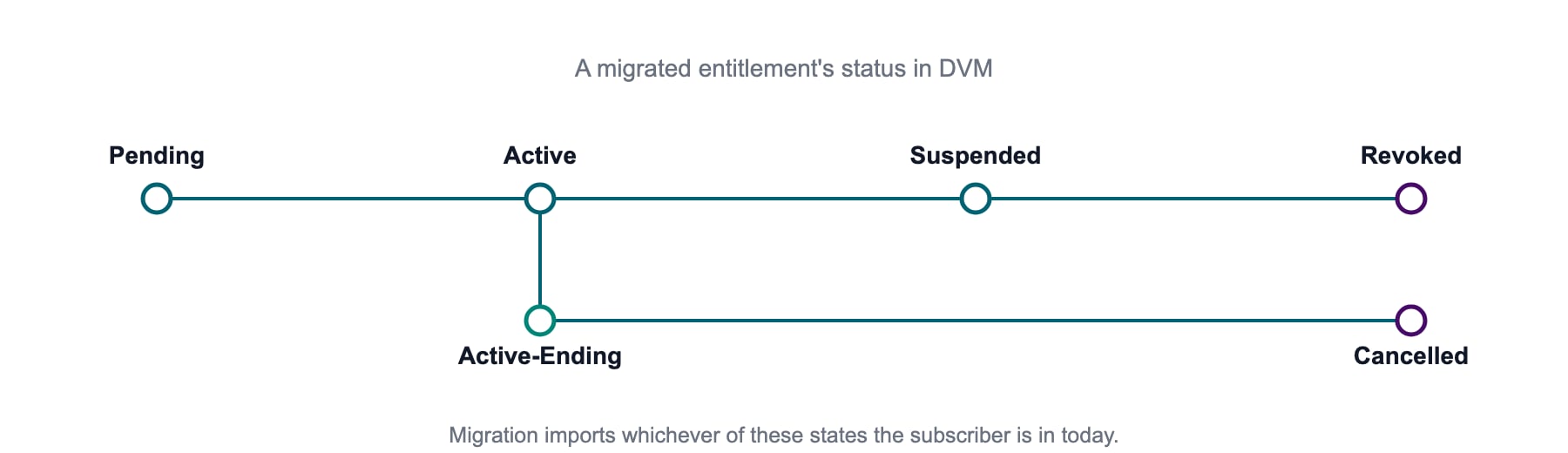
Bango DVM imports the current state of each entitlement and the supported lifecycle timestamps provided for the migration. That can include when the entitlement was created, activated, suspended, or terminated.
Exactly which dates carry across depends on the source data and migration design.
Migration moves the existing consumer base onto that model. New sign-ups can move to DVM on the same schedule or at a different point in the cutover plan.
## What migration changes
Migration creates the DVM records needed to manage an existing subscription without re-provisioning access that already exists at the Content Provider.
For each migrated subscription, DVM can establish:
* The current **Entitlement** state for each product the consumer can access.
* The **Consumer Offer** that groups the entitlement or entitlements under the configured Offer.
* The **Plan Lifecycle** used to manage lifecycle behavior such as renewals, upgrades, downgrades, pauses, and cancellations.
* The **Billing Plan** associated with that lifecycle.
DVM Billing & Charging is optional. Creating the Consumer Offer, Plan Lifecycle, and Billing Plan does not require you to move consumer charging into DVM. Your agreed operating model determines which billing and charging responsibilities move at cutover.
Read [Offer model](/offer-management/model) for the relationship between Offers, plans, products, and consumer access.
## DVM migration preserves current state
Bango DVM imports the current state of each entitlement and the supported lifecycle timestamps provided for the migration. That can include when the entitlement was created, activated, suspended, or terminated.
Exactly which dates carry across depends on the source data and migration design.
 Migration does not recreate the complete historical record of every change before cutover. Keep that history in your own systems if you need it for reporting, audit, or compliance.
## From standalone entitlements to Consumer Offers
An entitlement represents a consumer's right to access a product and its current state. In DVM, that entitlement sits within a Consumer Offer so DVM can manage the wider subscription lifecycle.
A Consumer Offer brings together three distinct parts:
* **Entitlement(s)** define which product or products the consumer can access and the current state of that access.
* **Plan Lifecycle** controls how the subscription progresses through its configured lifecycle.
* **Billing Plan** records the billing state associated with that Plan Lifecycle.
The same structure applies whether a consumer signs up through DVM or arrives through migration.
A Consumer Offer can contain more than one entitlement, which supports multi-party bundles. Whether existing entitlements can be combined into one Consumer Offer during migration depends on the migration capability and the design agreed for that project.
Migration does not recreate the complete historical record of every change before cutover. Keep that history in your own systems if you need it for reporting, audit, or compliance.
## From standalone entitlements to Consumer Offers
An entitlement represents a consumer's right to access a product and its current state. In DVM, that entitlement sits within a Consumer Offer so DVM can manage the wider subscription lifecycle.
A Consumer Offer brings together three distinct parts:
* **Entitlement(s)** define which product or products the consumer can access and the current state of that access.
* **Plan Lifecycle** controls how the subscription progresses through its configured lifecycle.
* **Billing Plan** records the billing state associated with that Plan Lifecycle.
The same structure applies whether a consumer signs up through DVM or arrives through migration.
A Consumer Offer can contain more than one entitlement, which supports multi-party bundles. Whether existing entitlements can be combined into one Consumer Offer during migration depends on the migration capability and the design agreed for that project.
 **Renewal-cycle alignment**
Renewal-aware behavior depends on the Plan Lifecycle having the required lifecycle data. If the migration includes the data needed to align the Plan Lifecycle to the consumer's existing renewal cycle, renewal-driven capabilities can use that cycle.
If it does not, the consumer can still migrate, but capabilities that depend on the true renewal cycle can be limited. The Billing Plan follows the configured Plan Lifecycle; it does not reconstruct missing renewal-cycle data.
## Before you start
Put the DVM integration and migration foundations in place before preparing a production batch:
* Complete [DVM onboarding](/getting-started/dvm-onboarding).
* Set up and test your integration in [DVM Sandbox](/partner-management/sandbox).
* Complete the relevant [DVM testing](/testing/testing-overview) before production activity.
* Configure the Offers needed for migration in your DVM Offer Catalog. Every migrated Consumer Offer requires a valid
**Renewal-cycle alignment**
Renewal-aware behavior depends on the Plan Lifecycle having the required lifecycle data. If the migration includes the data needed to align the Plan Lifecycle to the consumer's existing renewal cycle, renewal-driven capabilities can use that cycle.
If it does not, the consumer can still migrate, but capabilities that depend on the true renewal cycle can be limited. The Billing Plan follows the configured Plan Lifecycle; it does not reconstruct missing renewal-cycle data.
## Before you start
Put the DVM integration and migration foundations in place before preparing a production batch:
* Complete [DVM onboarding](/getting-started/dvm-onboarding).
* Set up and test your integration in [DVM Sandbox](/partner-management/sandbox).
* Complete the relevant [DVM testing](/testing/testing-overview) before production activity.
* Configure the Offers needed for migration in your DVM Offer Catalog. Every migrated Consumer Offer requires a valid offerId.
* Confirm the [Offer plan configuration](/offer-management/plan-configuration), including any lifecycle behavior that depends on renewal-cycle data.
* Prepare your notification endpoint and test the [Consumer Offer and Entitlement notifications](/entitlement-management/notifications) used by your integration.
* Confirm that you can export the consumer, entitlement, product, status, and lifecycle data required for migration.
## Plan the migration
Migration runs in seven controlled phases. The cutover plan defines when existing subscriptions and new sign-ups move from the old integration to DVM. They do not have to move on the same schedule.
 ### The seven phases
| Phase | Phase name | What happens |
| - | - | - |
| 1 | **Preparation** | Extract the current consumer and entitlement data and map it to the migration schema. Add any Content Provider-specific validation or enrichment required for the migration. |
| 2 | **Testing** | Run representative data through the agreed test process before production. Use Sandbox to validate the integration and operating flows, and resolve schema, mapping, lifecycle, and notification issues. |
| 3 | **Execution** | Import and validate the migration files, then run the migration service. DVM creates the entitlement and Consumer Offer records and establishes the configured Plan Lifecycle and Billing Plan. It does not re-provision access that already exists at the Content Provider. |
| 4 | **Cutover** | Move the agreed subscription operations onto DVM. Entitlement and lifecycle ownership follow the operating model agreed for the project. Billing and charging can remain outside DVM. |
| 5 | **Verification** | Confirm that each Consumer Offer was created correctly, is linked to the expected entitlement or entitlements, and has the expected lifecycle and Billing Plan state. |
| 6 | **Validation** | Exercise the required lifecycle behavior against migrated subscriptions. For example, request activation information for a migrated
### The seven phases
| Phase | Phase name | What happens |
| - | - | - |
| 1 | **Preparation** | Extract the current consumer and entitlement data and map it to the migration schema. Add any Content Provider-specific validation or enrichment required for the migration. |
| 2 | **Testing** | Run representative data through the agreed test process before production. Use Sandbox to validate the integration and operating flows, and resolve schema, mapping, lifecycle, and notification issues. |
| 3 | **Execution** | Import and validate the migration files, then run the migration service. DVM creates the entitlement and Consumer Offer records and establishes the configured Plan Lifecycle and Billing Plan. It does not re-provision access that already exists at the Content Provider. |
| 4 | **Cutover** | Move the agreed subscription operations onto DVM. Entitlement and lifecycle ownership follow the operating model agreed for the project. Billing and charging can remain outside DVM. |
| 5 | **Verification** | Confirm that each Consumer Offer was created correctly, is linked to the expected entitlement or entitlements, and has the expected lifecycle and Billing Plan state. |
| 6 | **Validation** | Exercise the required lifecycle behavior against migrated subscriptions. For example, request activation information for a migrated PENDING entitlement, perform supported product changes, and test cancellation. |
| 7 | **Monitoring** | Monitor live subscription activity after cutover, including migrated subscriptions, new sign-ups, activations, lifecycle notifications, and exceptions. |
## Prepare the migration data
Two files drive the migration service. Together, they describe the entitlement being moved and the Consumer Offer that will manage it in DVM.
Depending on the migration, a Bango delivery team may build these files from a simpler source export after validation or enrichment.
| File | Purpose |
| - | - |
| **Entitlement Migration File** | Contains the existing entitlement data, including the consumer/customer identifier, product key, status, and relevant dates. |
| **Consumer Offer Migration File** | Creates the Consumer Offer, identifies the configured offerId, links the entitlement or entitlements, and establishes the Consumer Offer structure from the configured Offer. |
### Fields to understand before mapping
* **Consumer/customer identifier** — identifies the consumer for the integration route. Some migrations must preserve an existing Content Provider identifier. Netflix PAI continuity is one example.
* **Offer ID** — identifies the configured Offer used to create the Consumer Offer.
* **Product key** — identifies the product or product tier used by the entitlement. Some Content Providers also require provider-specific product mapping.
* **Notification URL** — identifies the endpoint used for DVM lifecycle notifications.
See the [migration reference](/migrations/migration) for the complete migration file structures, example records, validation rules, and recovery behavior.
## Protect the migration
### Keep data secure
Migration files move through the secure transfer path agreed for the project and are loaded into the migration environment before processing.
Keep a clear input and output trail for every batch so you can identify what was submitted, what was processed, and what still needs resolution.
### Reconcile source data before migration
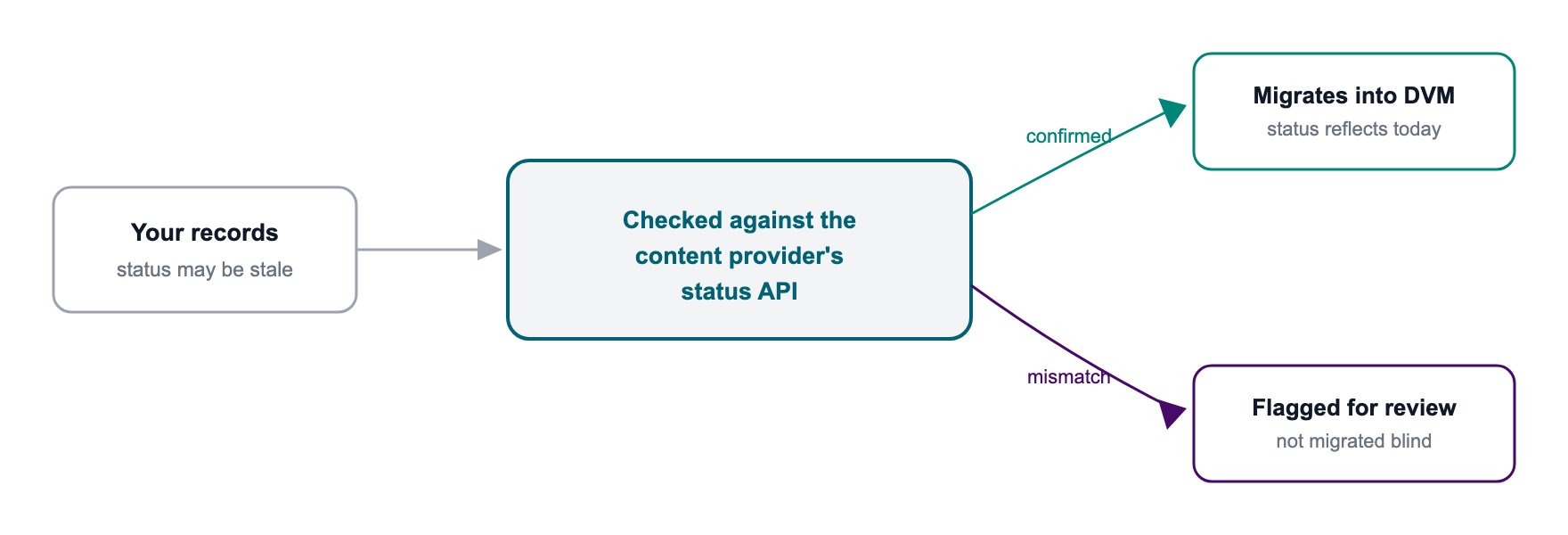
Source records do not always match the current subscription state. Statuses can drift, dates can be missing, and provider-specific mappings can change.
Validation and enrichment therefore depend on the Content Provider and migration design. For Netflix, for example, Bango checks each PAI against Netflix's Subscription Status API to retrieve the current status, Offer ID, and Bundle ID before the DVM migration records are prepared.
 > **Why reconciliation matters**
>
> If your source record and the Content Provider disagree about the current subscription state, resolve or exclude that record before it becomes a DVM entitlement.
## Stay in control during cutover
You do not have to move the whole consumer base in one step. Migration supports controlled batches with validation between them.
* Start with a small batch to prove the migration path.
* Review the result before increasing batch size.
* Set agreed error thresholds so processing stops when failures exceed tolerance.
* Use migration recovery for records left in failed or incomplete migration states.
* Handle successfully migrated records that need to be reversed through the rollback or termination process agreed for the migration.
* Leave gaps between batches when more evaluation time is required.
The overall schedule depends on volume, source-data quality, Content Provider-specific validation, and the review time planned between batches.
## Verify and operate after cutover
Migration is complete only when the new operating model works for migrated consumers.
Verify that:
* Consumer Offers and entitlements have the expected state.
* Lifecycle behavior matches the configured Offer.
* Required notifications reach your systems.
* Support teams can identify and manage migrated consumers.
* New sign-ups use the intended DVM route.
* Exceptions are recorded and resolved through the agreed process.
Continue monitoring migrated and newly provisioned subscriptions after cutover. The [testing overview](/testing/testing-overview) describes the wider DVM path from Sandbox validation toward production.
## Work with a Bango delivery team
A Bango delivery team can support the migration from planning through production cutover. The team reviews the design against the DVM model, confirms the Consumer Offer and Plan Lifecycle configuration, supports Sandbox testing, validates migration data, and monitors execution.
Different Content Providers add their own identity, product-mapping, operational, and cutover requirements. For a complete provider-specific example, see [Migrating a Netflix integration to DVM](/guides/tutorials/migrating-netflix-to-dvm).
## Questions we get asked
### Do I have to migrate every consumer at once?
No. Migrate in controlled batches over the timeline agreed for the project.
### What happens to new sign-ups during migration?
That depends on the cutover plan. New sign-ups can move to DVM on a different schedule from the existing consumer base.
### How long does a migration take?
It depends on volume, source-data quality, Content Provider-specific validation, and the agreed batch schedule. Migration timing is planned for each project using those inputs.
### Does the process work for any Content Provider?
The migration capability is reusable across Content Providers, but identity mapping, product mapping, validation, lifecycle requirements, and cutover steps can differ. The [Netflix migration guide](/guides/tutorials/migrating-netflix-to-dvm) shows how those provider-specific requirements fit into the common migration process.
### What if my records are wrong or incomplete?
The migration design defines how source records are validated before import. Records that cannot be validated are held back or reported for resolution rather than migrated without verification.
### Do I need to change my code before migration?
Migration runs through the DVM migration capability; it does not replay the live integration APIs. Your production DVM integration still needs to be onboarded and tested for the operations that move to DVM at cutover.
### What happens to historical consumer data?
DVM imports the current entitlement state and supported timestamps supplied for migration, not the complete historical change log. Keep historical records in your own systems where required.
### Can I migrate more than one Content Provider at the same time?
Yes, if the project is planned that way. Each Content Provider still follows its own validation, mapping, and cutover requirements.
### Can I pause partway through?
Yes. Batches do not have to run back-to-back. Controlled execution allows time for review and recovery between batches.
### Does migration change my commercial terms with a Content Provider?
No. Migration changes the technical route and operating model. It does not change the commercial agreement with the Content Provider.
### What if I cannot provide the existing renewal cycle?
The consumer can still migrate. The Consumer Offer, Plan Lifecycle, and Billing Plan are created using the configured Offer and lifecycle data available to the migration. Renewal-aware behavior that depends on the consumer's true cycle requires that cycle to be available to the Plan Lifecycle.
### Can a Consumer Offer contain more than one entitlement?
Yes. The Consumer Offer model supports multiple entitlements. Whether existing entitlements can be combined into one Consumer Offer during migration depends on the migration capability and the design agreed for the project.
## Related documentation
Understand the DVM migration model and prerequisites.
See migration file structures, examples, validation, and recovery.
Follow the complete migration process for an existing Netflix integration.
Validate DVM use cases in Sandbox before production.
> **Why reconciliation matters**
>
> If your source record and the Content Provider disagree about the current subscription state, resolve or exclude that record before it becomes a DVM entitlement.
## Stay in control during cutover
You do not have to move the whole consumer base in one step. Migration supports controlled batches with validation between them.
* Start with a small batch to prove the migration path.
* Review the result before increasing batch size.
* Set agreed error thresholds so processing stops when failures exceed tolerance.
* Use migration recovery for records left in failed or incomplete migration states.
* Handle successfully migrated records that need to be reversed through the rollback or termination process agreed for the migration.
* Leave gaps between batches when more evaluation time is required.
The overall schedule depends on volume, source-data quality, Content Provider-specific validation, and the review time planned between batches.
## Verify and operate after cutover
Migration is complete only when the new operating model works for migrated consumers.
Verify that:
* Consumer Offers and entitlements have the expected state.
* Lifecycle behavior matches the configured Offer.
* Required notifications reach your systems.
* Support teams can identify and manage migrated consumers.
* New sign-ups use the intended DVM route.
* Exceptions are recorded and resolved through the agreed process.
Continue monitoring migrated and newly provisioned subscriptions after cutover. The [testing overview](/testing/testing-overview) describes the wider DVM path from Sandbox validation toward production.
## Work with a Bango delivery team
A Bango delivery team can support the migration from planning through production cutover. The team reviews the design against the DVM model, confirms the Consumer Offer and Plan Lifecycle configuration, supports Sandbox testing, validates migration data, and monitors execution.
Different Content Providers add their own identity, product-mapping, operational, and cutover requirements. For a complete provider-specific example, see [Migrating a Netflix integration to DVM](/guides/tutorials/migrating-netflix-to-dvm).
## Questions we get asked
### Do I have to migrate every consumer at once?
No. Migrate in controlled batches over the timeline agreed for the project.
### What happens to new sign-ups during migration?
That depends on the cutover plan. New sign-ups can move to DVM on a different schedule from the existing consumer base.
### How long does a migration take?
It depends on volume, source-data quality, Content Provider-specific validation, and the agreed batch schedule. Migration timing is planned for each project using those inputs.
### Does the process work for any Content Provider?
The migration capability is reusable across Content Providers, but identity mapping, product mapping, validation, lifecycle requirements, and cutover steps can differ. The [Netflix migration guide](/guides/tutorials/migrating-netflix-to-dvm) shows how those provider-specific requirements fit into the common migration process.
### What if my records are wrong or incomplete?
The migration design defines how source records are validated before import. Records that cannot be validated are held back or reported for resolution rather than migrated without verification.
### Do I need to change my code before migration?
Migration runs through the DVM migration capability; it does not replay the live integration APIs. Your production DVM integration still needs to be onboarded and tested for the operations that move to DVM at cutover.
### What happens to historical consumer data?
DVM imports the current entitlement state and supported timestamps supplied for migration, not the complete historical change log. Keep historical records in your own systems where required.
### Can I migrate more than one Content Provider at the same time?
Yes, if the project is planned that way. Each Content Provider still follows its own validation, mapping, and cutover requirements.
### Can I pause partway through?
Yes. Batches do not have to run back-to-back. Controlled execution allows time for review and recovery between batches.
### Does migration change my commercial terms with a Content Provider?
No. Migration changes the technical route and operating model. It does not change the commercial agreement with the Content Provider.
### What if I cannot provide the existing renewal cycle?
The consumer can still migrate. The Consumer Offer, Plan Lifecycle, and Billing Plan are created using the configured Offer and lifecycle data available to the migration. Renewal-aware behavior that depends on the consumer's true cycle requires that cycle to be available to the Plan Lifecycle.
### Can a Consumer Offer contain more than one entitlement?
Yes. The Consumer Offer model supports multiple entitlements. Whether existing entitlements can be combined into one Consumer Offer during migration depends on the migration capability and the design agreed for the project.
## Related documentation
Understand the DVM migration model and prerequisites.
See migration file structures, examples, validation, and recovery.
Follow the complete migration process for an existing Netflix integration.
Validate DVM use cases in Sandbox before production.