> ## Documentation Index
> Fetch the complete documentation index at: https://docs.bango.com/llms.txt
> Use this file to discover all available pages before exploring further.
# Canceling or refunding a payment
> Deleting a transaction to release authorized funds or refund captured funds
In the Bango Platform, transactions are two-step: in the first step your store **authorizes** payment, and in the second step your store **captures** payment. Between authorization and capture you can cancel authorization to release all reserved funds. After capture, you may be able to refund the user: returning the full amount the user paid, or less than the full amount (a **partial** refund). Partial cancellation is not possible. To cancel or refund payment, you make a `DELETE` request to the Bango Payment API, specifying the transaction ID.
Some payment providers may not support full or partial refunds.
As part of the API request, you supply:
* The transaction ID
* Optionally, a structure representing the item the user is purchasing (required for partial refunds only)
* Optionally, custom transaction data
The API response is a structure that describes the result of the cancel/refund request.
### Sequence diagrams
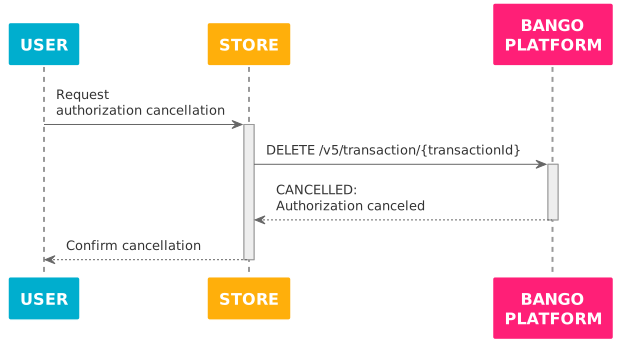
The Bango Platform successfully cancels authorization for a payment that is not yet captured:
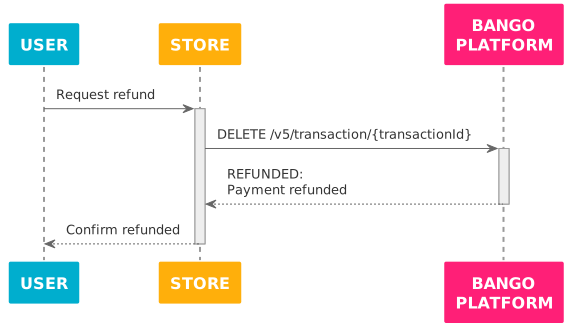
The Bango Platform successfully refunds a captured payment:
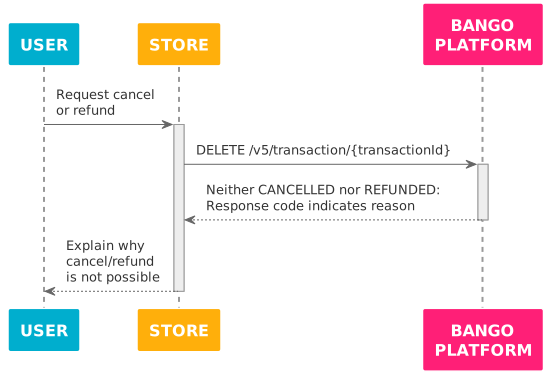
The Bango Platform fails to cancel authorization or refund payment:
### Skeleton code
```text theme={null}
function delete_transaction (transaction_id) {
// *Always* use this endpoint prefix for the Bango Payment API.
const base_url = "https://api.bango.net/v5/";
// Result value
let success = false;
try {
// Send UTF-8 JSON to the Bango Payment API and parse the JSON response.
// In this request we don't include a body parameter,
// which means we cancel/refund the full payment authorized/captured.
let response = rest_client_call({
method: "DELETE",
url: base_url + "transaction/" + transaction_id,
headers: {
"Authorization": get_authorization_header(),
},
}).from_json();
// The responseCode tells us the result.
switch (response.responseCode) {
// Success: payment canceled/refunded
case "CANCELLED": // Was authorized: now canceled (note spelling)
case "REFUNDED": // Was captured: now refunded
success = true;
break;
// Failure:
case "CANT_REFUND": // Unable to refund
case "ALREADY_REFUNDED": // Payment already refunded
throw "Unable to refund";
// Merchant problems
// These indicate issues in your code, not the Bango Platform.
case "BAD_REQUEST": // Invalid request
case "UNAUTHORIZED": // Check your credentials
case "NOT_FOUND": // Invalid transaction ID
throw "Merchant implementation error";
// Bango Platform issues
// These likely indicate transient problems.
// In production code, you might want to try the request again
// after a delay, ultimately falling back to an error state.
case "INTERNAL_ERROR":
case "CONNECT_ERROR":
case "FAILURE":
case "SERVICE_UNAVAILABLE":
case "CONNECT_TIMEOUT":
throw "Bango Platform unavailable"
// This might indicate Bango has added a new response code.
// Check the documentation again.
default:
throw "Unrecognized response code";
}
} catch (exception) {
// Production code might want to notify the merchant in some way,
// and/or log full details of the exception for later analysis,
// and degrade gracefully for the user.
output("An error occurred!");
output(exception);
}
// true if payment canceled/refunded, false if not
return success;
}
```
### FAQ
In the skeleton code above, the transaction ID is specified as a path parameter but no body parameters are included in the request. For refunds, this means the user is refunded the full amount for the purchase (the price specified when the payment was captured). To support partial refund, you would pass a body parameter that specifies a replacement `paymentItems` structure where the `grossAmount` and/or `taxAmount` is less than the original. For authorized but not captured payments, only full cancellation is possible.
You could also pass a body parameter that defines an `externalTransactionId` for the transaction.
See [Bango Payment / Merchant API reference / API reference overview](/legacy/dcb-payments-v5/api-reference/index) for detailed information on all request parameters.
All responses contain a `responseCode` string that indicates the result of the request. Use this code to determine how to react.
See [Bango Payment / Merchant API reference / API reference overview](/legacy/dcb-payments-v5/api-reference/index) for detailed information on all responses.