> ## Documentation Index
> Fetch the complete documentation index at: https://docs.bango.com/llms.txt
> Use this file to discover all available pages before exploring further.
# Retrieving transaction details
> Discovering the status of an authorized or completed transaction
For authorized or captured transactions, you can retrieve all details of the transaction by sending a `GET` request to the Bango Payment API, specifying the transaction ID.
The API response is a structure that includes the Bango ID of the purchaser, the payment method used, and the item purchased, as well as custom transaction data specified by the store.
### Sequence diagrams
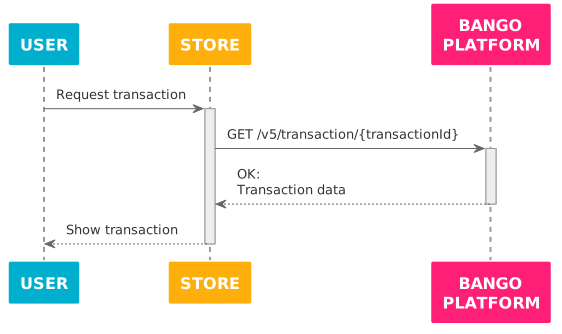
The Bango Platform successfully returns the transaction data:
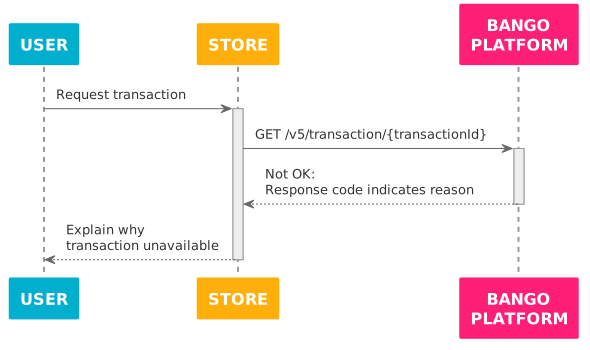
The Bango Platform fails to return transaction data:
### Skeleton code
```text theme={null}
function get_transaction (transaction_id) {
// *Always* use this endpoint prefix for the Bango Payment API.
const base_url = "https://api.bango.net/v5/";
// Result value
let transaction = null;
try {
// Send GET with path param to the Bango Payment API and parse the JSON response.
let response = rest_client_call({
method: "GET",
url: base_url + "transaction/" + transaction_id,
headers: {
"Authorization": get_authorization_header(),
},
}).from_json();
// The responseCode tells us the result.
switch (response.responseCode) {
// Success
case "OK":
transaction = response.transaction;
break;
// Merchant problems
// These indicate issues in your code, not the Bango Platform.
case "BAD_REQUEST": // Invalid request
case "UNAUTHORIZED": // Check your credentials
case "NOT_FOUND": // Invalid transaction ID
throw "Merchant implementation error";
// Bango Platform issues
// These likely indicate transient problems.
// In production code, you might want to try the request again
// after a delay, ultimately falling back to an error state.
case "INTERNAL_ERROR":
case "SERVICE_UNAVAILABLE":
throw "Bango Platform unavailable"
// This might indicate Bango has added a new response code.
// Check the documentation again.
default:
throw "Unrecognized response code";
}
} catch (exception) {
// Production code might want to notify the merchant in some way,
// and/or log full details of the exception for later analysis,
// and degrade gracefully for the user.
output("An error occurred!");
output(exception);
}
// transaction details if found, null if not found
return transaction;
}
```
### FAQ
The only parameter is the transaction ID, passed in the path of the request URL.
On success, `responseCode` is `OK` and the response includes a `transaction` object. Here's an example response:
```text theme={null}
{
"responseCode": "OK",
"responseMessage": "Success." ,
"transaction": {
"transactionId": "123456789",
"bangoUserId": "123456789",
"externalTransactionId": "my-unique-tx-id-12345678",
"paymentMethod": {
"type": "OPERATORBILLING",
"key": "SOME_NETWORK_NAME",
"description": "Direct operator billing",
"parameters": {}
},
"paymentItems": [
{
"itemName": "My item name",
"itemDescription": "My item description",
"itemCategory": "1",
"externalPaymentItemId": "my-unique-payment-id",
"submerchantReferenceKey": "my-submerchant-ref",
"price": {
"grossAmount": "0.99",
"currencyIso3": "USD",
"financialBreakdown": {
"taxAmount": "0.00"
}
}
}
],
"extensionData": {}
}
}
```
See [Bango Payment / Merchant API reference / API reference overview](/legacy/dcb-payments-v5/api-reference/index) for detailed information on all responses.