> ## Documentation Index
> Fetch the complete documentation index at: https://docs.bango.com/llms.txt
> Use this file to discover all available pages before exploring further.
# Retrieving multiple entitlements
> Fetching entitlements that match filter criteria
In the Bango Platform, entitlements describe a user's ability to access a service provided by a merchant. You can [retrieve a single entitlement record](/legacy/resale/reseller/entitlements/read) if you have its ID. Alternatively you can retrieve some or all of a user's entitlements at once by making a `POST` request to the Bango Resale API, specifying filter criteria.
The API response is a structure that contains:
* A response code, indicating the result of the request. Use this code to determine what to do next.
* For HTTP 200 responses, an array of matching entitlement records, including any custom data you've supplied.
### Sequence diagrams
The Bango Platform successfully returns all entitlement details.
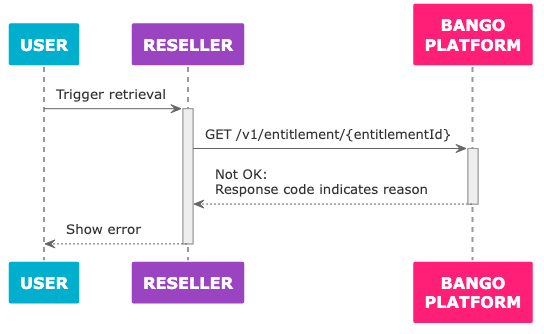 The Bango Platform fails to return entitlement details.
### Skeleton code
Here's some sample code in a C/Java-like language: adapt this code to your needs. Use the same API endpoint prefix with test credentials and with production credentials.
```text theme={null}
function get_entitlements (user_id, product = null, status = null) {
// *Always* use this endpoint prefix for the Bango Resale API.
const base_url = "https://resale.api.bango.net";
// This is what we're trying to find.
let entitlements = null;
const request_body_params = {
// Your unique identifier for the user.
customerIdentifier: user_id,
// Identifier for the product representing the service,
// supplied by Bango.
productKey: product,
// Entitlement status.
status: status,
};
try {
// POST UTF-8 JSON to the Bango Resale API and parse the JSON response
let response = rest_client_call({
method: "POST",
url: base_url + "entitlement/report",
headers: {
"Authorization": get_authorization_header(),
"Content-Type": "application/json",
},
body: make_json_string(request_body_params),
}).from_json();
// The responseCode tells us the result.
switch (response.responseCode) {
// Success
case "OK":
entitlements = response.entitlements;
break;
// Failures
// These may indicate issues in your code, not the Bango Platform.
case "BAD_REQUEST": // Invalid request
case "UNAUTHORIZED": // Check your credentials
case "NOT_FOUND": // Invalid entitlement ID
case "TOO_MANY_REQUESTS": // Request limit reached: try again later
throw "Unable to retrieve entitlement";
// Bango Platform issues
// These likely indicate transient problems.
// In production code, you might want to try the request again
// after a delay, ultimately falling back to an error state.
case "INTERNAL_ERROR":
case "SERVICE_UNAVAILABLE":
throw "Bango Platform unavailable";
// This might indicate Bango has added a new response code.
// Check the documentation again.
default:
throw "Unrecognized response code";
}
} catch (exception) {
// Production code might want to notify the reseller in some way,
// and/or log full details of the exception for later analysis,
// and degrade gracefully for the user.
output("An error occurred!");
output(exception);
}
// null if entitlement not retrieved.
// If retrieved, will have an entitlementId, status, and other properties:
// see API reference.
return entitlement;
}
```
### FAQ
You must specify the `customerIdentifier` parameter, identifying the user whose entitlements you want to retrieve. You can't request entitlements for more than one user at once.
The other parameters are optional. When specifying more than one parameter, the Bango Platform returns entitlements that match **all** parameters (the filters `AND` together: more filters means fewer matches).
All responses contain a `responseCode` string that indicates the result of the request. Use `responseCode` to determine how to react.
On success, `responseCode` is `OK` and an `entitlements` property contains an array of entitlement records. Here's an example response:
```text theme={null}
{
"responseCode": "OK",
"responseMessage": "Success",
"entitlements": [
{
"entitlementId": "a25100b8-4e0c-4e37-b921-cac9cb1e930f",
"status": "ACTIVE",
"dateCreated": "2017-08-31T14:15:03Z",
"dateActivated": "2017-08-31T14:16:64Z",
"dateEnded": null,
"dateSuspended": null,
"dateResumed": null,
"dateLastUpdated": "2017-08-31T14:16:64Z",
"customerIdentifier": "my-user-123456789",
"merchantAccountKey": "BANGO_ENTERTAINMENT",
"productKey": "MUSIC_30D",
"offerKey": null,
"activationCode": "",
"entitlementDisplayName": "30 days of Bango Music",
"dateExpiry": "2017-09-30T23:59:59.999Z",
"notificationUrl": "https://example.com/entitlement/notification",
"extensionData": {
"price": "9.99",
"currencyIso3": "GBP",
"channelType": "WEB_PROMOTION",
"channelSource": "https://bango.com/promo",
"campaignKey": "SUMMER_PROMO",
"referrer": "SEARCH_ENGINE"
}
},
{
"entitlementId": "4f82bc40-4e1b-4ddd-3956-3869dbc1a094",
"status": "ACTIVE",
"dateCreated": "2017-09-02T12:05:14Z",
"dateActivated": "2017-09-03T11:33:62Z",
"dateEnded": null,
"dateSuspended": null,
"dateResumed": null,
"dateLastUpdated": "2017-09-03T17:00:01Z",
"customerIdentifier": "my-user-123456789",
"merchantAccountKey": "BANGO_ENTERTAINMENT",
"productKey": "MUSIC_30D",
"offerKey": null,
"activationCode": "",
"entitlementDisplayName": "30 days of Bango Music",
"dateExpiry": "2017-10-22T23:59:59.999Z",
"notificationUrl": "https://example.com/entitlement/notification",
"extensionData": {
"price": "9.99",
"currencyIso3": "GBP",
"channelType": "WEB_PROMOTION",
"channelSource": "https://bango.com/promo",
"campaignKey": "SUMMER_PROMO",
"referrer": "SEARCH_ENGINE"
}
}
]
}
```
See [Bango Resale / For resellers / Reseller API reference / Reseller API reference overview](/legacy/resale/reseller/api-ref/index) for detailed information on all responses.
The Bango Platform fails to return entitlement details.
### Skeleton code
Here's some sample code in a C/Java-like language: adapt this code to your needs. Use the same API endpoint prefix with test credentials and with production credentials.
```text theme={null}
function get_entitlements (user_id, product = null, status = null) {
// *Always* use this endpoint prefix for the Bango Resale API.
const base_url = "https://resale.api.bango.net";
// This is what we're trying to find.
let entitlements = null;
const request_body_params = {
// Your unique identifier for the user.
customerIdentifier: user_id,
// Identifier for the product representing the service,
// supplied by Bango.
productKey: product,
// Entitlement status.
status: status,
};
try {
// POST UTF-8 JSON to the Bango Resale API and parse the JSON response
let response = rest_client_call({
method: "POST",
url: base_url + "entitlement/report",
headers: {
"Authorization": get_authorization_header(),
"Content-Type": "application/json",
},
body: make_json_string(request_body_params),
}).from_json();
// The responseCode tells us the result.
switch (response.responseCode) {
// Success
case "OK":
entitlements = response.entitlements;
break;
// Failures
// These may indicate issues in your code, not the Bango Platform.
case "BAD_REQUEST": // Invalid request
case "UNAUTHORIZED": // Check your credentials
case "NOT_FOUND": // Invalid entitlement ID
case "TOO_MANY_REQUESTS": // Request limit reached: try again later
throw "Unable to retrieve entitlement";
// Bango Platform issues
// These likely indicate transient problems.
// In production code, you might want to try the request again
// after a delay, ultimately falling back to an error state.
case "INTERNAL_ERROR":
case "SERVICE_UNAVAILABLE":
throw "Bango Platform unavailable";
// This might indicate Bango has added a new response code.
// Check the documentation again.
default:
throw "Unrecognized response code";
}
} catch (exception) {
// Production code might want to notify the reseller in some way,
// and/or log full details of the exception for later analysis,
// and degrade gracefully for the user.
output("An error occurred!");
output(exception);
}
// null if entitlement not retrieved.
// If retrieved, will have an entitlementId, status, and other properties:
// see API reference.
return entitlement;
}
```
### FAQ
You must specify the `customerIdentifier` parameter, identifying the user whose entitlements you want to retrieve. You can't request entitlements for more than one user at once.
The other parameters are optional. When specifying more than one parameter, the Bango Platform returns entitlements that match **all** parameters (the filters `AND` together: more filters means fewer matches).
All responses contain a `responseCode` string that indicates the result of the request. Use `responseCode` to determine how to react.
On success, `responseCode` is `OK` and an `entitlements` property contains an array of entitlement records. Here's an example response:
```text theme={null}
{
"responseCode": "OK",
"responseMessage": "Success",
"entitlements": [
{
"entitlementId": "a25100b8-4e0c-4e37-b921-cac9cb1e930f",
"status": "ACTIVE",
"dateCreated": "2017-08-31T14:15:03Z",
"dateActivated": "2017-08-31T14:16:64Z",
"dateEnded": null,
"dateSuspended": null,
"dateResumed": null,
"dateLastUpdated": "2017-08-31T14:16:64Z",
"customerIdentifier": "my-user-123456789",
"merchantAccountKey": "BANGO_ENTERTAINMENT",
"productKey": "MUSIC_30D",
"offerKey": null,
"activationCode": "",
"entitlementDisplayName": "30 days of Bango Music",
"dateExpiry": "2017-09-30T23:59:59.999Z",
"notificationUrl": "https://example.com/entitlement/notification",
"extensionData": {
"price": "9.99",
"currencyIso3": "GBP",
"channelType": "WEB_PROMOTION",
"channelSource": "https://bango.com/promo",
"campaignKey": "SUMMER_PROMO",
"referrer": "SEARCH_ENGINE"
}
},
{
"entitlementId": "4f82bc40-4e1b-4ddd-3956-3869dbc1a094",
"status": "ACTIVE",
"dateCreated": "2017-09-02T12:05:14Z",
"dateActivated": "2017-09-03T11:33:62Z",
"dateEnded": null,
"dateSuspended": null,
"dateResumed": null,
"dateLastUpdated": "2017-09-03T17:00:01Z",
"customerIdentifier": "my-user-123456789",
"merchantAccountKey": "BANGO_ENTERTAINMENT",
"productKey": "MUSIC_30D",
"offerKey": null,
"activationCode": "",
"entitlementDisplayName": "30 days of Bango Music",
"dateExpiry": "2017-10-22T23:59:59.999Z",
"notificationUrl": "https://example.com/entitlement/notification",
"extensionData": {
"price": "9.99",
"currencyIso3": "GBP",
"channelType": "WEB_PROMOTION",
"channelSource": "https://bango.com/promo",
"campaignKey": "SUMMER_PROMO",
"referrer": "SEARCH_ENGINE"
}
}
]
}
```
See [Bango Resale / For resellers / Reseller API reference / Reseller API reference overview](/legacy/resale/reseller/api-ref/index) for detailed information on all responses.