> ## Documentation Index
> Fetch the complete documentation index at: https://docs.bango.com/llms.txt
> Use this file to discover all available pages before exploring further.
# Revoking an entitlement
> Withdrawing service access immediately
In the Bango Platform, entitlements describe a user's ability to access a service provided by a merchant. In some circumstances you might want a "hard ending" for the entitlement: to immediately stop the user from accessing the service. For example, if a user permanently deletes their account, you may want to be sure they can no longer access the service. To do this, you **revoke** the entitlement by making a `POST` request to the Bango Resale API. (To withdraw access at the end of the period for which the user has already paid, [cancel the entitlement](/legacy/resale/reseller/entitlements/cancel) instead.)
(You may cancel and revoke entitlements only in accordance with the merchant product descriptions and your commercial agreements.)
As part of the API request, you supply:
* The entitlement ID
* A reason for revocation, including a category, a code, and a human-readable description
* Optionally, custom data
The API response is a structure that contains:
* A response code, indicating the result of the request. Use this code to determine what to do next.
* For HTTP 200 responses, the entitlement record. The record includes the revocation reason and any additional custom data as part of the entitlement's `extensionData` property, and the status is `REVOKED`.
* For HTTP 202 responses, the entitlement record. The record includes the revocation reason and any additional custom data as part of the entitlement's `extensionData` property, and the status won't be changed until the merchant sends an asynchronous notification to the Bango Platform.
The Bango Platform automatically revokes entitlements when a merchant tells it to do so. Set an entitlement's `notificationUrl` to receive a `POST` notification when this happens.
### Sequence diagrams
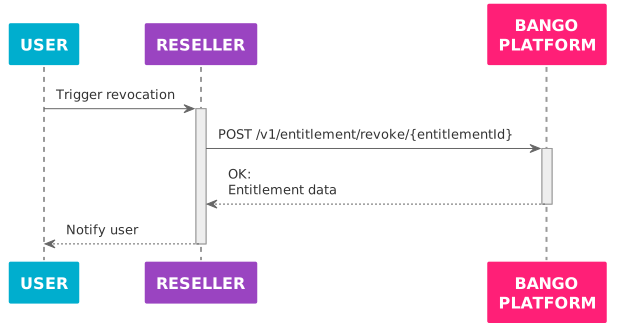
The Bango Platform revokes the service for the user.
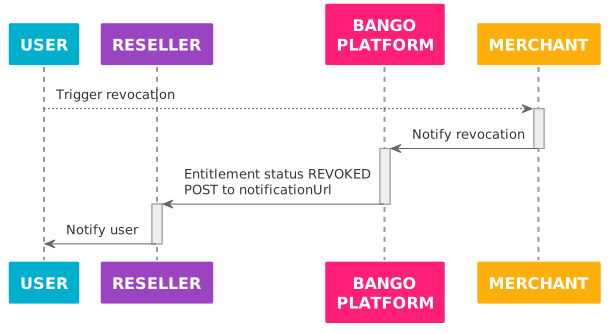
The merchant providing the service tells the Bango Platform to revoke the entitlement.
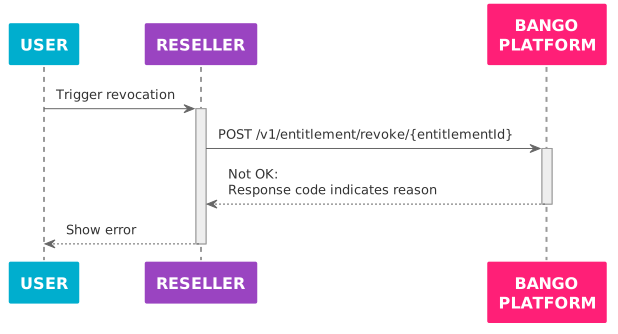
The Bango Platform can't revoke the service for the user, and returns the reason in the response to the API request.
### Skeleton code
Here's some sample code in a C/Java-like language: adapt this code to your needs. Use the same API endpoint prefix with test credentials and with production credentials.
Some functions referenced in the skeleton code, such as `redirect_device_to`, are not defined. You need to implement these where possible.
```text theme={null}
function revoke_entitlement (entitlement_id, reason_category, reason_code, reason_desc, extra_custom_properties = {}) {
// *Always* use this endpoint prefix for the Bango Resale API.
const base_url = "https://resale.api.bango.net";
// This is what's returned with HTTP 2xx.
let entitlement = null;
const request_body_params = extra_custom_properties
.copy()
.set('cancelReasonCategory', reason_category)
.set('cancelReasonCode', reason_code)
.set('cancelReasonDescription', reason_desc);
try {
// POST UTF-8 JSON to the Bango Resale API and parse the JSON response
let response = rest_client_call({
method: "POST",
url: base_url + "entitlement/revoke/" + entitlement_id,
headers: {
"Authorization": get_authorization_header(),
"Content-Type": "application/json",
},
body: make_json_string(request_body_params),
}).from_json();
// The responseCode tells us the result.
switch (response.responseCode) {
// Success: entitlement is revoked
case "OK":
entitlement = response;
break;
// Failures
// These may indicate issues in your code, not the Bango Platform.
case "BAD_REQUEST": // Invalid request
case "UNAUTHORIZED": // Check your credentials
case "NOT_AVAILABLE": // Unable to revoke this entitlement
case "NOT_FOUND": // Invalid entitlement ID
case "ALREADY_EXISTS": // You tried to reuse an entitlement ID
case "TOO_MANY_REQUESTS": // Request limit reached: try again later
throw "Unable to create entitlement";
// Bango Platform issues
// These likely indicate transient problems.
// In production code, you might want to try the request again
// after a delay, ultimately falling back to an error state.
case "INTERNAL_ERROR":
case "SERVICE_UNAVAILABLE":
throw "Bango Platform unavailable";
// This might indicate Bango has added a new response code.
// Check the documentation again.
default:
throw "Unrecognized response code";
}
} catch (exception) {
// Production code might want to notify the reseller in some way,
// and/or log full details of the exception for later analysis,
// and degrade gracefully for the user.
output("An error occurred!");
output(exception);
}
// null if entitlement not revoked.
// if revoked, will have an entitlementId, status, and other properties:
// see API reference.
return entitlement;
}
```
### FAQ
You must pass the entitlement ID in the path of the request URL.
In the request body, you should set the `cancelReasonCategory`, `cancelReasonCode`, and `cancelReasonDescription` parameters. You can also include any other parameters, with any names and values you like.
The `cancelReasonCategory`, `cancelReasonCode`, `cancelReasonDescription`, and custom properties are added to the entitlement's `extensionData` property.
See [Bango Resale / For resellers / Reseller API reference / Reseller API reference overview](/legacy/resale/reseller/api-ref/index) for detailed information on all request parameters, and [Bango Resale / For resellers / Reseller API reference / Standard reasons for suspend, cancel, revoke, and terminate](/legacy/resale/reseller/api-ref/reason-codes) for the values to use for `cancelReasonCategory` and `cancelReasonCode`.
All responses contain a `responseCode` string that indicates the result of the request. Use this code to determine how to react. For each distinct `responseCode`, the response might include other useful values.
See [Bango Resale / For resellers / Reseller API reference / Reseller API reference overview](/legacy/resale/reseller/api-ref/index) for detailed information on all responses.