> ## Documentation Index
> Fetch the complete documentation index at: https://docs.bango.com/llms.txt
> Use this file to discover all available pages before exploring further.
# Suspending an entitlement
> Temporarily withdrawing service access for a user
In the Bango Platform, entitlements describe a user's ability to access a service provided by a merchant. In some circumstances you might want to temporarily withdraw a user's access to that service. To do this, where supported by the merchant and service, you **suspend** the entitlement by making a `PATCH` request to the Bango Resale API with `entitlementBenefits` set to `SUSPENDED`. (To restore access later, [resume the entitlement](/legacy/resale/reseller/entitlements/resume).)
As part of the API request, you supply:
* The entitlement ID
* The entitlement benefits enum
* Optionally, custom data
The API response is a structure that contains:
* A response code, indicating the result of the request. Use this code to determine what to do next.
* For HTTP 200 responses, the entitlement record. The record includes any additional custom data as part of the entitlement's `extensionData` property. The record status is `SUSPENDED`, and the `dateSuspended` property marks the date and time of the suspension request.
* For HTTP 202 responses, the entitlement record. The record includes any additional custom data as part of the entitlement's `extensionData` property. The record status is `ACTIVE`. HTTP 202 responses indicates that the merchant has accepted your request and has queued it for processing within their system. You should expect to receive a notification from Bango when the merchant has completed the processing of the queued request.
### Sequence diagrams
The Bango Platform suspends the service for the user.
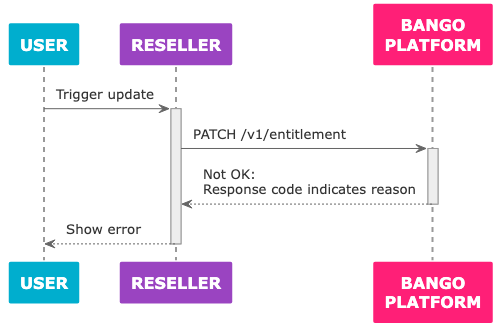 The Bango Platform can't suspend the service for the user, and returns the reason in the response to the API request.
### Skeleton code
Here's some sample code in a C/Java-like language: adapt this code to your needs. Use the same API endpoint prefix with test credentials and with production credentials.
Some functions referenced in the skeleton code are not defined. You need to implement these where possible.
```text theme={null}
function suspend_entitlement (entitlement_id, reason_category, reason_code, reason_desc, extra_custom_properties = {}) {
// *Always* use this endpoint prefix for the Bango Resale API.
const base_url = "https://resale.api.bango.net";
// This is what's returned with HTTP 2xx.
let entitlement = null;
// The entitlement ID is passed in the body not the path.
// Here, assume properties_to_update is a map of entitlement
// property names to values.
// See API ref for details of which properties you can update.
const request_body_params = properties_to_update
.copy()
.set('entitlementId', entitlement_id);
.set('entitlementBenefits', "SUSPENDED");
try {
// PATCH UTF-8 JSON to the Bango Resale API and parse the JSON response
let response = rest_client_call({
method: "PATCH",
url: base_url + "entitlement",
headers: {
"Authorization": get_authorization_header(),
"Content-Type": "application/json",
},
body: make_json_string(request_body_params),
}).from_json();
// The responseCode tells us the result.
switch (response.responseCode) {
// Success: no action required
case "OK":
entitlement = response;
break;
// More to do: The reseller must take action
case "CLIENT_ACTION_REQUIRED":
// This response parameter tells us what we need to do.
switch (response.parameters.action) {
case "NAVIGATE_TO_URL":
// Send the user to a particular web page
// to complete a merchant-defined process.
// Set entitlement's notificationUrl to
// receive notification of entitlement
// changes asynchronously.
redirect_device_to({
url: response.parameters.url,
});
// Updated entitlement is returned in this case
// but with status PENDING.
entitlement = response;
break;
default:
// Unrecognized action.
// Check the documentation again.
throw "Unrecognized client action";
}
break;
// Failures
// These may indicate issues in your code, not the Bango Platform.
case "BAD_REQUEST": // Invalid request
case "UNAUTHORIZED": // Check your credentials
case "NOT_AVAILABLE": // Unable to update this entitlement
case "NOT_FOUND": // Invalid entitlement ID
case "TOO_MANY_REQUESTS": // Request limit reached: try again later
throw "Unable to update entitlement";
// Bango Platform issues
// These likely indicate transient problems.
// In production code, you might want to try the request again
// after a delay, ultimately falling back to an error state.
case "INTERNAL_ERROR":
case "SERVICE_UNAVAILABLE":
throw "Bango Platform unavailable";
// This might indicate Bango has added a new response code.
// Check the documentation again.
default:
throw "Unrecognized response code";
}
} catch (exception) {
// Production code might want to notify the reseller in some way,
// and/or log full details of the exception for later analysis,
// and degrade gracefully for the user.
output("An error occurred!");
output(exception);
}
// null if entitlement not updated.
// if updated, will have an entitlementId, status, and other properties:
// see API reference.
return entitlement;
}
```
### FAQ
You must set the `entitlementId`. Include any other parameters you want to update: any parameter not included in the request is not changed.
In the request body, you should set the `entitlementBenefits` parameter. You can also include any other parameters, with any names and values you like.
See [Bango Resale / For resellers / Reseller API reference / Reseller API reference overview](/legacy/resale/reseller/api-ref/index) for detailed information on all request parameters.
All responses contain a `responseCode` string that indicates the result of the request. Use this code to determine how to react.
On success, `responseCode` is `OK` and other properties describe the entitlement. In particular, the `status` property is `SUSPENDED` and the `dateSuspended` property contains a timestamp marking the time of the suspension request. Here's an example response:
```text theme={null}
{
"responseCode": "OK",
"responseMessage": "Success",
"entitlementId": "a25100b8-4e0c-4e37-b921-cac9cb1e930f",
"activationCode": "",
"customerIdentifier": "my-customer-identifer-123456",
"productKey": "30_DAYS_MUSIC",
"entitlementDisplayName": "30 days of Bango Music",
"offerKey": "BUNDLE",
"merchantAccountKey": "BANGO",
"status": "SUSPENDED",
"dateCreated": "2017-07-28T14:15:03Z",
"dateActivated": "2017-07-28T14:30:05Z",
"dateExpiry": null,
"dateEnded": null,
"dateSuspended": "2017-07-29T12:13:14Z",
"dateResumed": null,
"extensionData": {}
}
```
On accepted, `responseCode` is `ACCEPTED` and other properties describe the entitlement. In particular, the `status` property is `ACTIVE`. Here's an example response:
```text theme={null}
{
"responseCode": "ACCEPTED",
"responseMessage": "Update request accepted by merchant.",
"entitlementId": "a25100b8-4e0c-4e37-b921-cac9cb1e930f",
"activationCode": "",
"customerIdentifier": "my-customer-identifer-123456",
"productKey": "30_DAYS_MUSIC",
"entitlementDisplayName": "30 days of Bango Music",
"offerKey": "BUNDLE",
"merchantAccountKey": "BANGO",
"status": "ACTIVE",
"dateCreated": "2017-07-28T14:15:03Z",
"dateActivated": "2017-07-28T14:30:05Z",
"dateExpiry": null,
"dateEnded": null,
"dateSuspended": null,
"dateResumed": null,
"extensionData": {}
}
```
See [Bango Resale / For resellers / Reseller API reference / Reseller API reference overview](/legacy/resale/reseller/api-ref/index) for detailed information on all responses.
The Bango Platform can't suspend the service for the user, and returns the reason in the response to the API request.
### Skeleton code
Here's some sample code in a C/Java-like language: adapt this code to your needs. Use the same API endpoint prefix with test credentials and with production credentials.
Some functions referenced in the skeleton code are not defined. You need to implement these where possible.
```text theme={null}
function suspend_entitlement (entitlement_id, reason_category, reason_code, reason_desc, extra_custom_properties = {}) {
// *Always* use this endpoint prefix for the Bango Resale API.
const base_url = "https://resale.api.bango.net";
// This is what's returned with HTTP 2xx.
let entitlement = null;
// The entitlement ID is passed in the body not the path.
// Here, assume properties_to_update is a map of entitlement
// property names to values.
// See API ref for details of which properties you can update.
const request_body_params = properties_to_update
.copy()
.set('entitlementId', entitlement_id);
.set('entitlementBenefits', "SUSPENDED");
try {
// PATCH UTF-8 JSON to the Bango Resale API and parse the JSON response
let response = rest_client_call({
method: "PATCH",
url: base_url + "entitlement",
headers: {
"Authorization": get_authorization_header(),
"Content-Type": "application/json",
},
body: make_json_string(request_body_params),
}).from_json();
// The responseCode tells us the result.
switch (response.responseCode) {
// Success: no action required
case "OK":
entitlement = response;
break;
// More to do: The reseller must take action
case "CLIENT_ACTION_REQUIRED":
// This response parameter tells us what we need to do.
switch (response.parameters.action) {
case "NAVIGATE_TO_URL":
// Send the user to a particular web page
// to complete a merchant-defined process.
// Set entitlement's notificationUrl to
// receive notification of entitlement
// changes asynchronously.
redirect_device_to({
url: response.parameters.url,
});
// Updated entitlement is returned in this case
// but with status PENDING.
entitlement = response;
break;
default:
// Unrecognized action.
// Check the documentation again.
throw "Unrecognized client action";
}
break;
// Failures
// These may indicate issues in your code, not the Bango Platform.
case "BAD_REQUEST": // Invalid request
case "UNAUTHORIZED": // Check your credentials
case "NOT_AVAILABLE": // Unable to update this entitlement
case "NOT_FOUND": // Invalid entitlement ID
case "TOO_MANY_REQUESTS": // Request limit reached: try again later
throw "Unable to update entitlement";
// Bango Platform issues
// These likely indicate transient problems.
// In production code, you might want to try the request again
// after a delay, ultimately falling back to an error state.
case "INTERNAL_ERROR":
case "SERVICE_UNAVAILABLE":
throw "Bango Platform unavailable";
// This might indicate Bango has added a new response code.
// Check the documentation again.
default:
throw "Unrecognized response code";
}
} catch (exception) {
// Production code might want to notify the reseller in some way,
// and/or log full details of the exception for later analysis,
// and degrade gracefully for the user.
output("An error occurred!");
output(exception);
}
// null if entitlement not updated.
// if updated, will have an entitlementId, status, and other properties:
// see API reference.
return entitlement;
}
```
### FAQ
You must set the `entitlementId`. Include any other parameters you want to update: any parameter not included in the request is not changed.
In the request body, you should set the `entitlementBenefits` parameter. You can also include any other parameters, with any names and values you like.
See [Bango Resale / For resellers / Reseller API reference / Reseller API reference overview](/legacy/resale/reseller/api-ref/index) for detailed information on all request parameters.
All responses contain a `responseCode` string that indicates the result of the request. Use this code to determine how to react.
On success, `responseCode` is `OK` and other properties describe the entitlement. In particular, the `status` property is `SUSPENDED` and the `dateSuspended` property contains a timestamp marking the time of the suspension request. Here's an example response:
```text theme={null}
{
"responseCode": "OK",
"responseMessage": "Success",
"entitlementId": "a25100b8-4e0c-4e37-b921-cac9cb1e930f",
"activationCode": "",
"customerIdentifier": "my-customer-identifer-123456",
"productKey": "30_DAYS_MUSIC",
"entitlementDisplayName": "30 days of Bango Music",
"offerKey": "BUNDLE",
"merchantAccountKey": "BANGO",
"status": "SUSPENDED",
"dateCreated": "2017-07-28T14:15:03Z",
"dateActivated": "2017-07-28T14:30:05Z",
"dateExpiry": null,
"dateEnded": null,
"dateSuspended": "2017-07-29T12:13:14Z",
"dateResumed": null,
"extensionData": {}
}
```
On accepted, `responseCode` is `ACCEPTED` and other properties describe the entitlement. In particular, the `status` property is `ACTIVE`. Here's an example response:
```text theme={null}
{
"responseCode": "ACCEPTED",
"responseMessage": "Update request accepted by merchant.",
"entitlementId": "a25100b8-4e0c-4e37-b921-cac9cb1e930f",
"activationCode": "",
"customerIdentifier": "my-customer-identifer-123456",
"productKey": "30_DAYS_MUSIC",
"entitlementDisplayName": "30 days of Bango Music",
"offerKey": "BUNDLE",
"merchantAccountKey": "BANGO",
"status": "ACTIVE",
"dateCreated": "2017-07-28T14:15:03Z",
"dateActivated": "2017-07-28T14:30:05Z",
"dateExpiry": null,
"dateEnded": null,
"dateSuspended": null,
"dateResumed": null,
"extensionData": {}
}
```
See [Bango Resale / For resellers / Reseller API reference / Reseller API reference overview](/legacy/resale/reseller/api-ref/index) for detailed information on all responses.