

POST request to the Bango Payment API.
As part of the API request, you supply:
- The user’s identified Bango ID
- A structure representing the item the user wants to purchase
- At least one URL that the Bango Platform might use to pass your store a transaction ID asynchronously
- Optionally, the payment methods you would like to be offered
- Optionally, custom transaction data
- Either a unique, opaque, persistent transaction ID (the payment is authorized)
- Or a reason why the transaction can’t be created (the payment is not authorized)
- Or a request for the store to perform an action (the payment is not yet authorized: a transaction ID or failure may be passed to your store asynchronously by a URL notification)
Sequence diagrams
The Bango Platform authorizes payment, and returns the transaction ID in the response to the API request: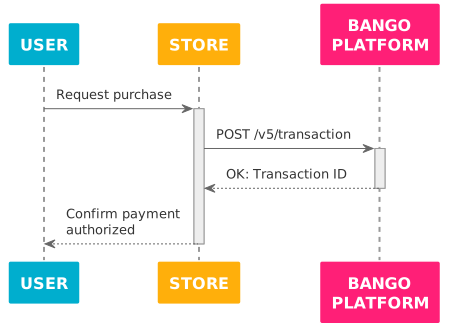
The Bango Platform denies authorization for payment, and returns the reason in the response to the API request: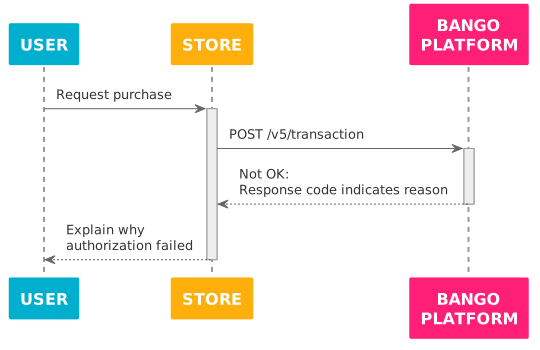
The Bango Platform needs your store to redirect the user to a payment authorization flow URL to determine whether the payment is authorized or not. You redirect the user, and when the user completes the payment authorization flow the Bango Platform tells your store whether payment is authorized or not – either using a user redirection, or by direct server-to-server communication.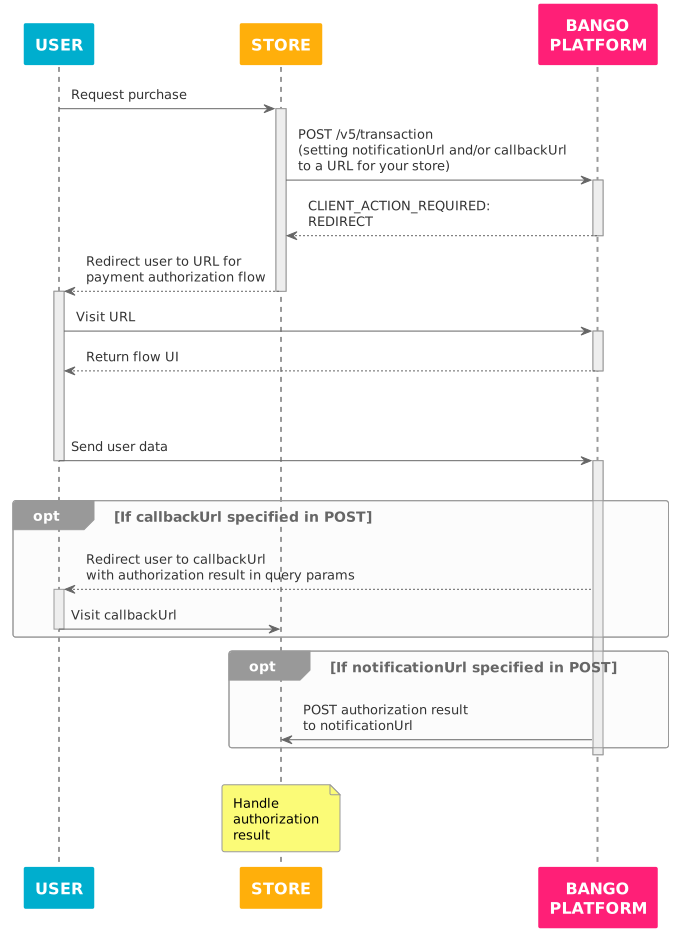
Skeleton code
FAQ
Which request parameters should I set?
Which request parameters should I set?
You must set the
bangoUserId and paymentItems parameters, to allow the Bango Platform to check whether the user is permitted to purchase the item, to check whether the prices are supported price points for the payment provider, and to reserve the appropriate funds to authorize payment.You must set at least one of the extensionData.notificationUrl and extensionData.callbackUrl parameters in the request, to support asynchronous notification of transaction IDs.You can omit paymentMethods if you want the Bango Platform to consider all possible payment methods.See Bango Payment / Merchant API reference / API reference overview for detailed information on all request parameters.What are all the possible API response structures?
What are all the possible API response structures?
All responses contain a
responseCode string that indicates the result of the request. Use this code to determine how to react. For each distinct responseCode, the response might include other useful values.See Bango Payment / Merchant API reference / API reference overview for detailed information on all responses.In the redirect case, how do I receive the authorization result?If the payment provider or payment method requires the user to be directed to a web-based payment flow, the Bango Platform responds to an authorization request with the responseCode value CLIENT_ACTION_REQUIRED and parameters.action value REDIRECT (other actions might be supported in future). In this case, the response does not include a transaction ID as the payment has not yet been authorized.When the user completes the payment flow, the Bango Platform generates a structure similar to an authorization API response, including the parameters responseCode, transactionId (0 on failure), and externalTransactionId (if specified in the authorization request). Valid values for responseCode are as for the authorization API response, except that CLIENT_ACTION_REQUIRED is never used.The Bango Platform then sends a POST request to the extensionData.notificationUrl, if specified in your store’s original authorization request, including this structure as the notification POST body. For example: