

Why migrate
Most subscription bundling partnerships start one integration at a time. Each new partnership means another API, another set of billing rules, and another set of support flows to build and maintain. The cost isn’t just the first connection. It continues for the life of the partnership. That cost compounds. Ten content providers can mean ten entitlement models, ten ways a subscription can fail, and ten sets of edge cases for support teams to learn. Every new bundle has to work around whichever partner integrations it needs. Digital Vending Machine® (Bango DVM™) gives you a simpler path. One connection gives you a shared operating model for entitlements, lifecycle management, billing, and charging across the subscriptions you sell. Instead of starting another integration project every time you add or combine services, you define the offer in the DVM Offer Catalog and use the same model underneath. This works in either direction. A reseller can consolidate content provider connections, and a content provider can consolidate reseller connections. One connection replaces many separate ones and gives you a simpler foundation for growing your offer range.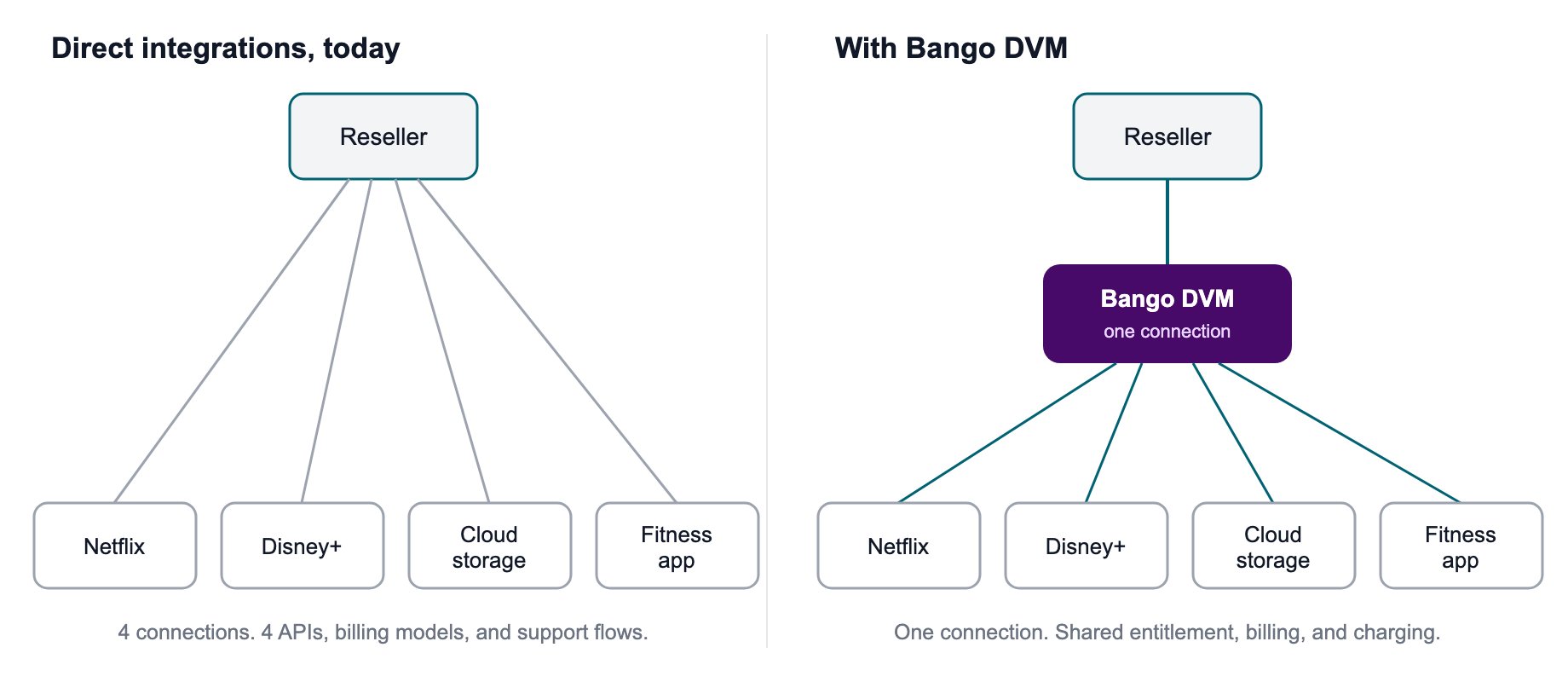
Direct integrations multiply. Bango DVM replaces them with one connection.
DVM migration preserves current state
Bango DVM imports the current state of each entitlement and the lifecycle timestamps provided for that migration. That can include when the entitlement was created, activated, suspended, or terminated. Exactly which dates carry across depends on the source data and the migration design.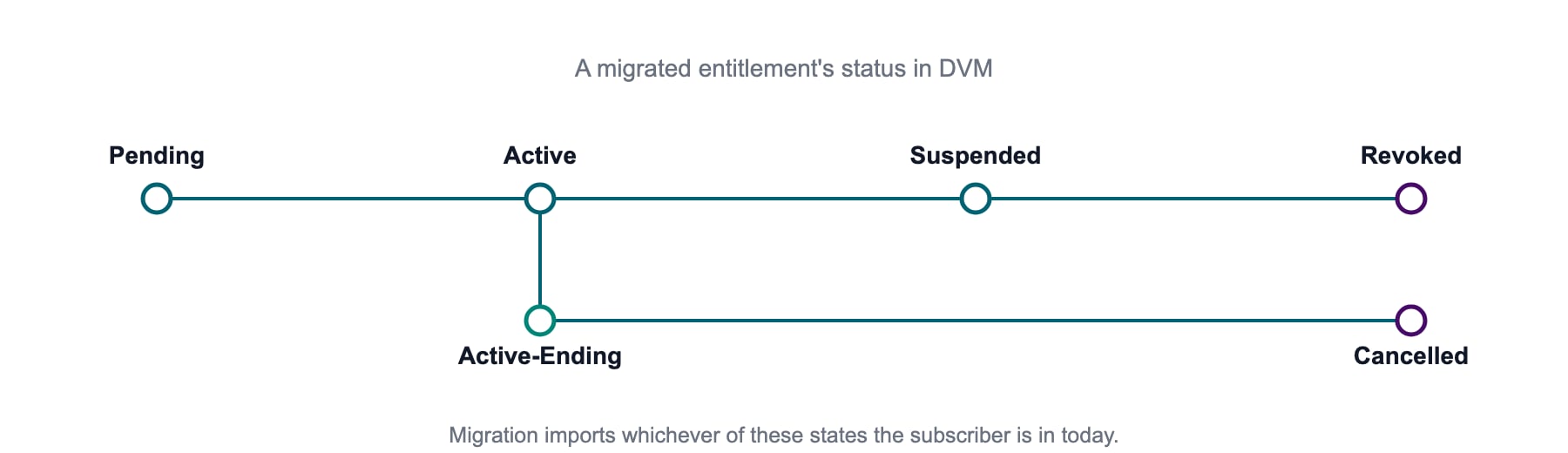
Migration imports the current state of each entitlement.
From standalone entitlements to Consumer Offers
An entitlement is a record of what a consumer can access and whether that access is on or off. That’s entitlement management, but it’s only part of the subscription lifecycle. A migrated subscription now sits inside the Offers-based DVM. A Consumer Offer brings together three distinct parts:- Entitlement(s) define which product or products the consumer can access and the current state of that access.
- Plan Lifecycle is the lifecycle engine. It drives renewals, upgrades, downgrades, pauses, and cancellations.
- Billing Plan is the billing record that follows the Plan Lifecycle. It records what has been charged and what is charged next.
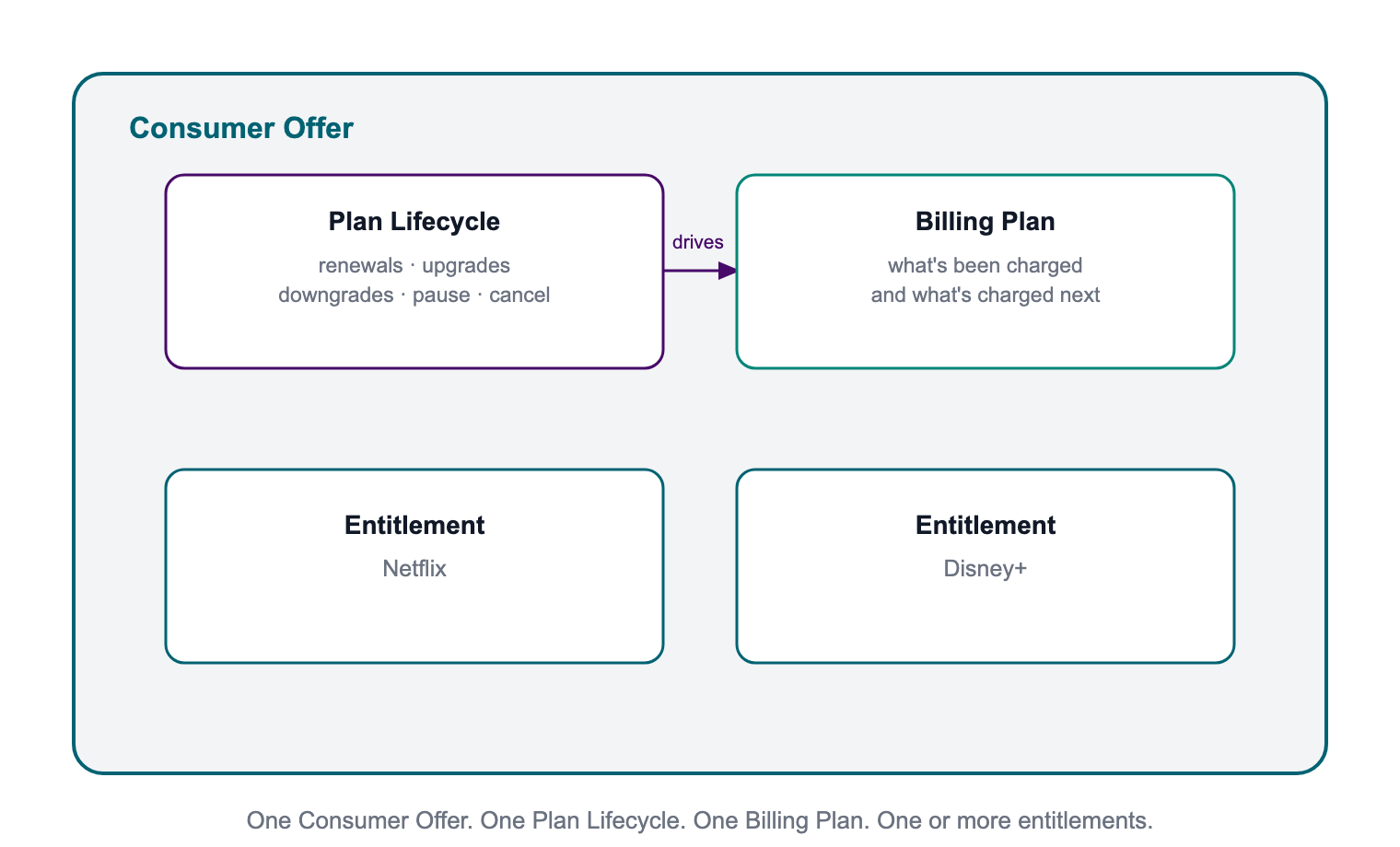
A Consumer Offer brings together entitlements, Plan Lifecycle, and Billing Plan as distinct parts.
Renewal-cycle alignmentRenewal-aware behavior depends on the Plan Lifecycle having the right lifecycle data. If your migration provides the data needed to align the Plan Lifecycle to the consumer’s existing renewal cycle, renewal-driven capabilities can use that cycle. If it doesn’t, the consumer can still migrate, but capabilities that depend on the true renewal cycle can be limited.The Billing Plan follows the configured Plan Lifecycle. It doesn’t create the missing renewal-cycle data itself.
Plan the migration
Migration runs in seven controlled phases: data preparation, sandbox testing, execution and cutover, then post-migration verification, validation and monitoring. The cutover plan defines when the existing consumer base and new sign-ups move from the old integration to the Bango DVM. They don’t have to move on the same schedule.
Seven phases, one controlled migration.
Before you start
Get these foundations in place before you prepare a production batch:- You are set up, onboarded and tested in the DVM Sandbox.
- Your offers exist in the DVM Offer Catalog, so every migrated subscription has a configured
offerIdto attach to. - You can export the consumer and entitlement data needed for migration, including status and the relevant dates.
- Your notification endpoint is ready for the DVM lifecycle notifications used by your integration.
The seven phases
| Phase | Phase name | What happens |
|---|---|---|
| 1 | Preparation | Extract the current consumer and entitlement data and map it to the migration schema: consumer/customer identifier, product key, status, and the relevant dates. Add provider-specific validation or enrichment where the migration needs it. |
| 2 | Testing | Run representative data through a sandbox test environment first. Nothing here touches production. This is where you catch schema mismatches, missing fields, product-mapping problems, and bad assumptions before a live migration. |
| 3 | Execution | Import and validate the migration files, then run the migration service. It creates the DVM entitlement and Consumer Offer records and establishes the configured Plan Lifecycle and Billing Plan. It doesn’t re-provision an entitlement that already exists at the content provider. |
| 4 | Cutover | Move the agreed subscription operations onto Bango DVM. Entitlement and lifecycle ownership follow the operating model you’ve agreed. Billing and charging are a separate decision and can stay outside Bango DVM. |
| 5 | Verification | Confirm that each Consumer Offer was created correctly, linked to the expected entitlement or entitlements, and has the expected lifecycle and Billing Plan state. Anything that doesn’t match is surfaced for resolution. |
| 6 | Validation | Test the lifecycle of migrated data. For example, for a migrated Pending entitlement PENDING, validating the lifecycle with requesting activation info; update and cancel. |
| 7 | Monitoring | Ongoing active monitoring of live subscription services, including new sign-ups and activations as well as active subscription lifecycles that have been migrated. |
Prepare the data Bango DVM needs
Two files drive the migration service. Together, they describe the entitlement being moved and the Consumer Offer that will manage it in Bango DVM. Depending on the migration, a Bango team may build those files from a simpler source file after validation or enrichment.Fields to understand before mapping
- Consumer/customer identifier: the value used to identify the consumer for the route. How that value is shared or mapped to a content provider depends on the integration. Some migrations have to preserve an existing provider identifier. Netflix PAI continuity is one example.
- Offer ID: identifies the configured Offer in the DVM Offer Catalog used to create the Consumer Offer. The Offer defines the products, product tiers, and plan configuration available to that Consumer Offer.
- Product key: identifies the product or product tier used by the entitlement. For some content providers, it also maps to provider-specific product information.
- Notification URL: the endpoint used for the DVM lifecycle notifications configured for the integration.
Protect the migration
Keep data secure
Migration files move through the secure transfer path agreed for the project and are loaded into the migration environment before processing. A migration can touch a large consumer base, so keep a clear input and output file trail. You need to be able to show what was submitted, what was processed, and what needs to be resolved.Reconcile source data before you trust it
Source records don’t always match the current subscription state. Statuses can drift, dates can be missing, and provider-specific mappings can change. Validation and enrichment are specific to the migration. For Netflix, for example, Bango checks each PAI against Netflix’s Subscription Status API to retrieve the current status, Offer ID, and Bundle ID before the DVM migration records are prepared. Other content providers can need different checks.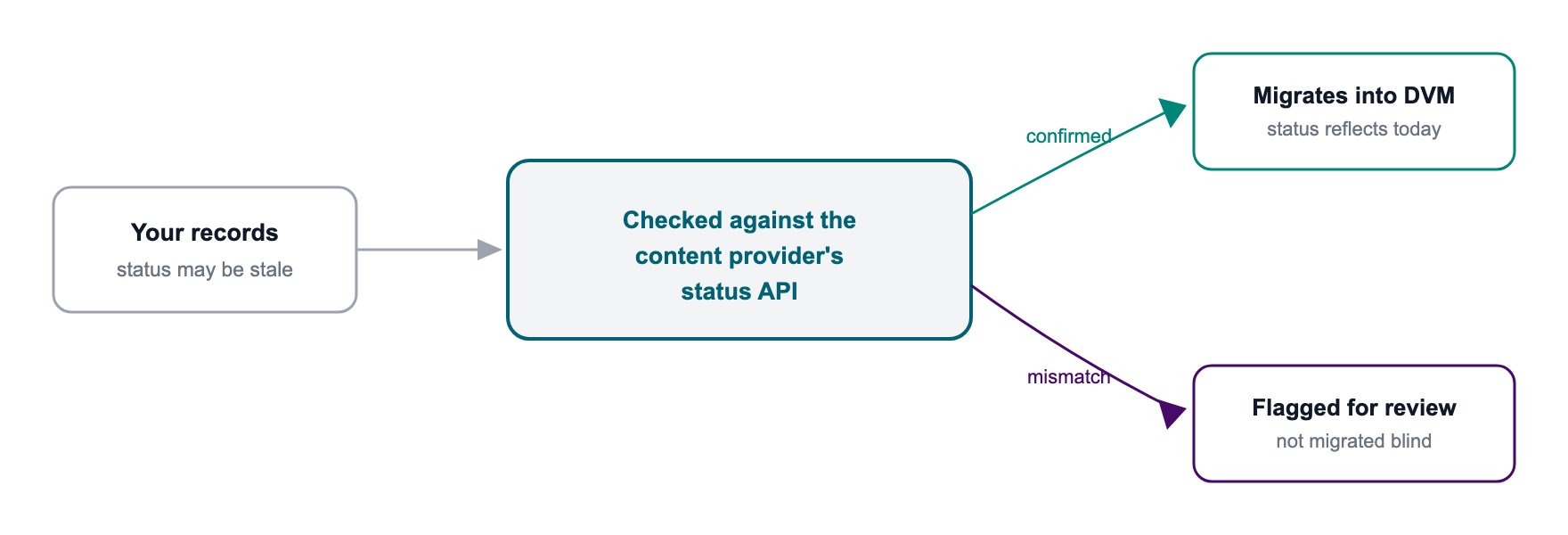
Validate provider-specific data before you trust it for migration.
Why reconciliation matters If your source record and the content provider disagree about the current subscription state, resolve or exclude that record before it becomes a DVM entitlement.
Stay in control during cutover
You don’t have to move the whole consumer base in one step. The migration service supports controlled batches with validation between them.- Start with a small batch to prove the pipeline, review the result, then increase the batch size as confidence grows.
- Set fail-fast thresholds so processing stops if failures go above the agreed tolerance.
- Use migration recovery to restart or resume records in failed or incomplete migration states.
- Handle successfully migrated records that need to be rolled back through the rollback or termination process agreed for that migration.
- Leave gaps between batches when you need more time to evaluate the result. You don’t have to migrate every day.