

Why move a direct Netflix integration
A direct Netflix integration requires your systems to implement Netflix-specific subscription lifecycle behavior and keep pace with Netflix integration requirements. Moving that integration to Bango DVM puts Netflix into the same Offer, Consumer Offer, entitlement, and lifecycle model used for other Content Providers. Bango DVM handles the Netflix-specific integration path behind that common DVM model. This reduces the amount of provider-specific logic your teams need to operate and maintain. It also means Netflix can participate in DVM Offers alongside other supported products without requiring a separate subscription-management path.Target architecture
Your systems keep the consumer relationship, storefront, and the responsibilities defined by your commercial and billing model. DVM manages the Consumer Offer, entitlement state, lifecycle behavior, and Netflix-specific integration calls that move onto DVM. Billing does not have to move at the same time. If you already charge consumers through your own systems, you can continue to do so while Netflix entitlement and lifecycle management move onto DVM. Read Offer model for the DVM relationship between Offers, plans, products, Consumer Offers, and entitlements.Preserve the Netflix consumer identity
Partner Account Identifier (PAI)
Netflix identifies each consumer using a Partner Account Identifier (PAI). Your direct integration already sends this value to Netflix. The same PAI must carry across migration so Netflix continues to recognize the existing consumer. For the DVM migration:- The existing PAI is preserved rather than replaced by a new Bango identity.
- The PAI is used as the DVM
customerIdentifierfor the entitlement and the correspondingconsumerIdentifierfor the Consumer Offer. - Route configuration maps that consumer/customer identifier to the Content Provider
customerId. - DVM sends that
customerIdto Netflix as the PAI. - Bango-generated
entitlementIdandconsumerOfferIdvalues remain separate from the PAI. bangoUserIdandsharedCustomerIdare not used for this identifier mapping.
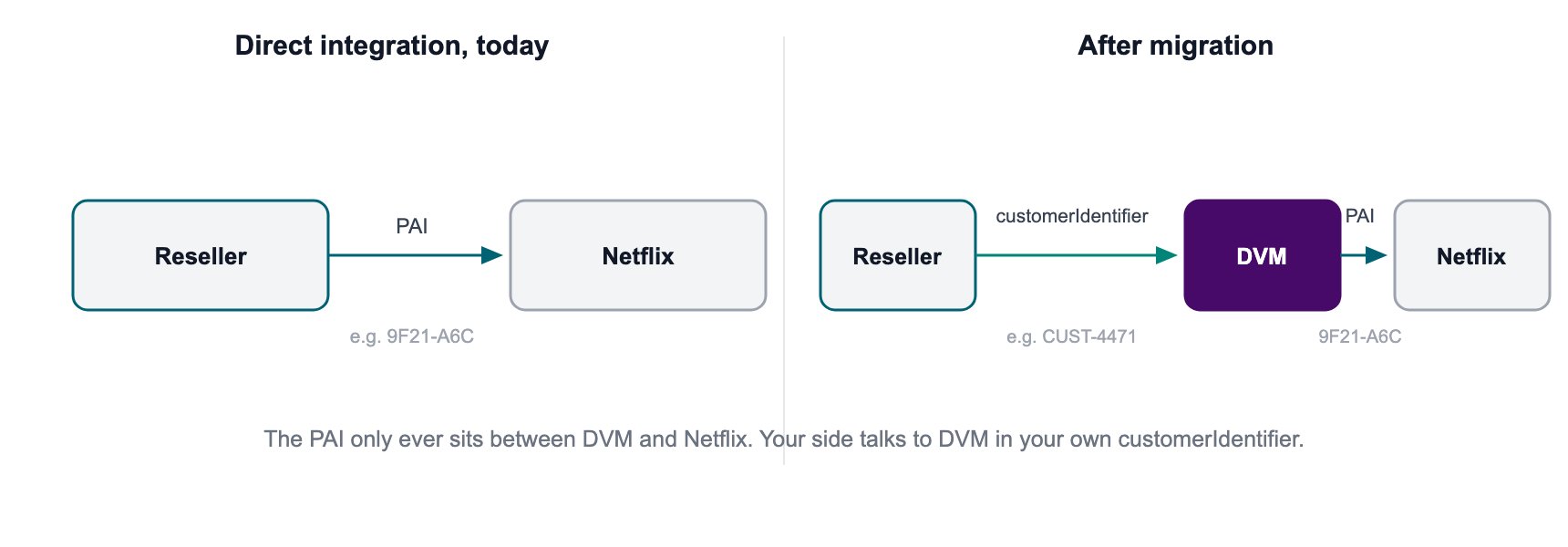
The PAI stays the same. The integration layer changes.
Map Netflix products correctly
Netflix identifies a product using an Offer ID and Bundle ID together. Each valid Offer ID and Bundle ID combination maps to a Bango product key and to the configured DVM Offer that contains that product. Check this mapping before migration. A wrong or missing mapping prevents the consumer from being migrated into the intended Netflix tier until the mapping is corrected.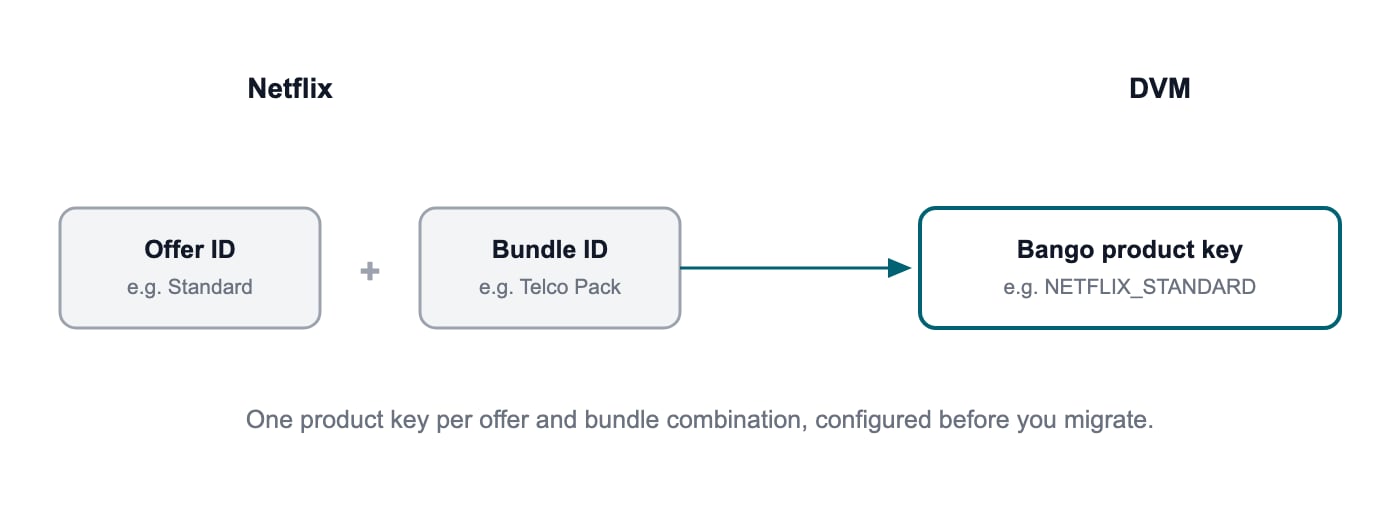
Each Netflix Offer ID and Bundle ID combination maps to a Bango product key.
Verify the current Netflix subscription state
Do not rely only on the Reseller source record when preparing the migration. Netflix migrations require an independently verified view of the current Netflix subscription. Before migration, DVM checks each PAI against Netflix’s Subscription Status API. This confirms:- The current Netflix subscription status.
- The Netflix Offer ID.
- The Netflix Bundle ID.
EnrolledbecomesPENDING.ActivatedbecomesACTIVE.- Other Netflix statuses are excluded from migration and written to the non-migrated or failures output with the reason.
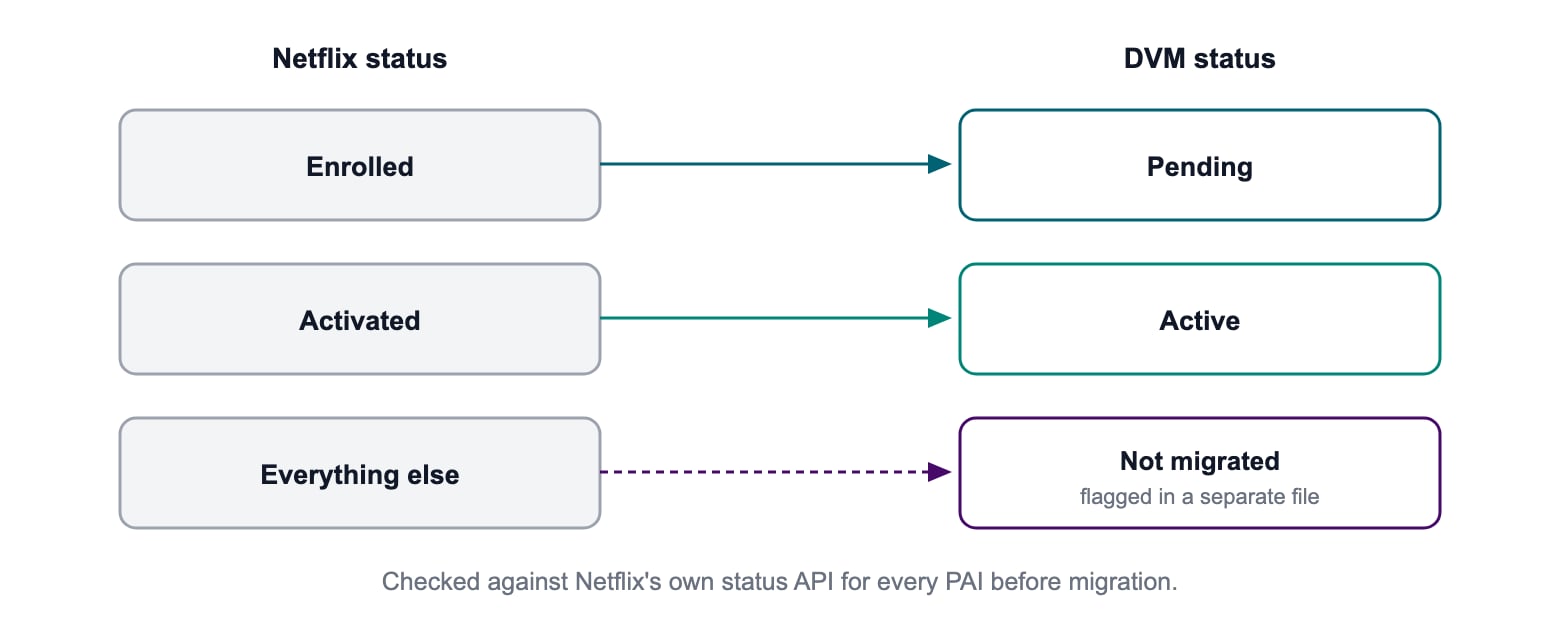
Every PAI is checked against Netflix before the DVM migration record is created.
Before you start
Complete the DVM and Netflix preparation before the first production batch:- Complete DVM onboarding.
- Set up and test the integration in DVM Sandbox.
- Complete the relevant DVM testing.
- Configure the DVM Offers that represent the Netflix products being migrated.
- Confirm every Netflix Offer ID and Bundle ID maps to the correct DVM product key and Offer.
- Export the existing PAI and subscription data required for migration.
- Prepare and test your DVM notification endpoint.
- Implement and test Netflix account-recovery flows through DVM.
- Agree the cutover and product-change approach with Netflix.
- Confirm whether billing remains in your existing systems or uses DVM Billing & Charging.
Test steady-state Netflix operations before migration
Migration changes the integration route, but consumers will still need normal Netflix lifecycle and support operations after cutover. Test these before moving the existing base.Account recovery
After migration, Resellers use the DVM account recovery API rather than integrating directly with Netflix recovery flows. DVM handles the Netflix-specific steps. Two flows should be implemented and tested:- Login recovery. Your service calls the DVM account-recovery API. DVM validates that the entitlement is active, checks Netflix’s Subscription Status API, and when the Netflix subscription is
Activated, requests anAccountRecoverytoken from Netflix. DVM returns the recovery URL so the consumer can enter the Netflix recovery flow. - Wrong-email recovery. Netflix can revert the subscription to
Enrolledand Bango sendsACCOUNT_UNLINKEDto the Reseller. The Reseller calls the same DVM APIs. DVM checks the Netflix status and, when it isEnrolled, requests aBundletoken and returns an activation URL. After the consumer activates again, DVM sendsACCOUNT_LINKED.
Run the Netflix migration in seven phases
The Netflix migration follows the same seven-phase DVM migration model, with additional Netflix checks inside each phase.
See the migration reference for the migration file structures, validation rules, and recovery behavior.
Control product changes during migration
For a controlled period during migration, Netflix-originated product changes are disabled until the Reseller and Netflix agree to enable them. Product-tier changes made through the Reseller are a separate flow and can work synchronously through DVM. Some product changes depend on the consumer’s actual renewal cycle, for example a pro-rated change at renewal. DVM can only perform these calculations when the required renewal-cycle data is available.If renewal-cycle data is not migrated, the entitlement can still move to DVM. Features that depend on the consumer’s actual renewal cycle will be limited until the required lifecycle data is available.
Migrate in controlled batches
Do not move the full Netflix base in one step unless that is the agreed migration design. Start with a small production batch. Verify identity continuity, product mapping, notifications, lifecycle behavior, and support readiness before increasing volume. Set agreed error thresholds so processing stops when failures exceed tolerance. Resolve or hold records that fail Netflix validation rather than migrating them without verification.What a controlled rollout looks like
A documented live migration for a major European telco used controlled batches for an existing Netflix and Disney+ consumer base.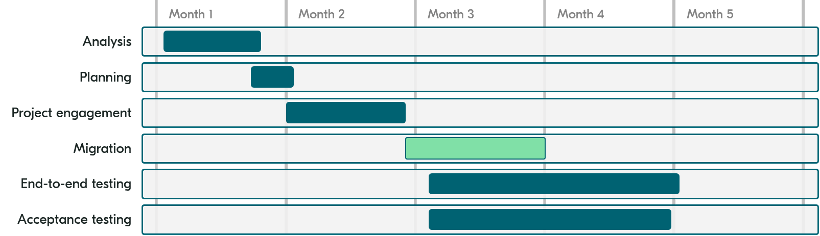
Typical project stages and timings for a controlled migration.

Migration volume started small and increased after verification.

Each migration day included defined acceptance, verification, and exception tasks.
Verify the migration
For each production batch, confirm that:- The PAI is unchanged.
- The Netflix subscription still resolves to the same consumer.
- The Netflix Offer ID and Bundle ID map to the expected DVM product.
- The entitlement has the expected DVM state.
- The Consumer Offer is created against the expected DVM Offer.
- Required notifications reach the Reseller.
- Account recovery works for migrated consumers.
- New sign-ups use the intended DVM integration route.
- Failed or excluded records have a clear reason and resolution path.
Questions we get asked
Does the consumer’s PAI change?
No. The existing PAI is preserved throughout migration.Will Netflix treat migrated consumers as new sign-ups?
No. Netflix continues to identify the consumer through the existing PAI.Do I have to move billing to Bango DVM?
No. You can continue charging consumers through your existing billing systems if that is the agreed operating model.What happens when a consumer’s Netflix status does not validate?
That consumer is not migrated. The reason is recorded so it can be investigated separately.How does this help us launch more bundle offers?
Once Netflix is managed through DVM, it uses the same Offer, Consumer Offer, entitlement, and lifecycle model as other supported Content Providers. Netflix can therefore participate in DVM Offers without maintaining a separate Netflix subscription-management path.Does Netflix need to be involved in the migration?
Yes. The migration must be coordinated with Netflix, including the cutover of integration endpoints and product-change flows. Your commercial agreement with Netflix does not change.What if the renewal cycle is not available?
The consumer can still migrate. However, lifecycle behavior that depends on the consumer’s actual renewal cycle can be limited until the required lifecycle data is available.Related documentation
Migrating to the Bango DVM
Follow the provider-independent DVM migration journey.
Migration reference
See migration file structures, examples, validation, and recovery.
Recover account for product
Implement the DVM account-recovery behavior used after migration.
Testing overview
Validate DVM use cases in Sandbox before production.