

POST request to the Bango Resale API. (To immediately withdraw access, revoke the entitlement instead.)
(You may cancel and revoke entitlements only in accordance with the merchant product descriptions and your commercial agreements.)
As part of the API request, you supply:
- The entitlement ID
- A reason for cancellation, including a category, a code, and a human-readable description
- Optionally, custom data
- A response code, indicating the result of the request. Use this code to determine what to do next.
- For HTTP 200 responses, the entitlement record. The record includes the cancellation reason and any additional custom data as part of the entitlement’s
extensionDataproperty, and the status isACTIVE-ENDINGorCANCELLEDdepending on the use cases the merchant supports. - For HTTP 202 responses, the entitlement record. The record includes the cancellation reason and any additional custom data as part of the entitlement’s
extensionDataproperty, and the status won’t be changed until the merchant sends an asynchronous notification to the Bango Platform.
notificationUrl to receive a POST notification when this happens.
Sequence diagrams
Successful HTTP 200 service cancellation
Successful HTTP 200 service cancellation
The Bango Platform cancels the service for the user.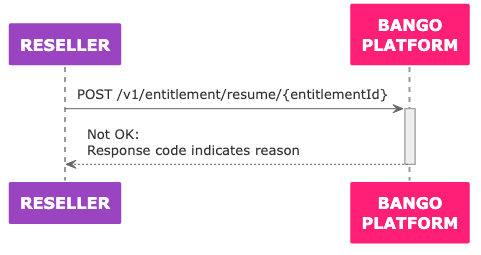
Service cancellation by merchant
Service cancellation by merchant
The merchant providing the service tells the Bango Platform to cancel the entitlement.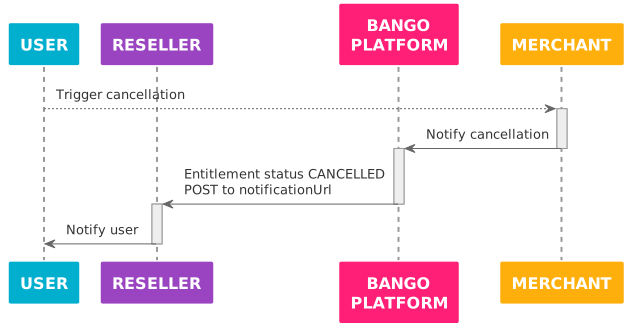
Failed request for service cancellation
Failed request for service cancellation
The Bango Platform can’t cancel the service for the user, and returns the reason in the response to the API request.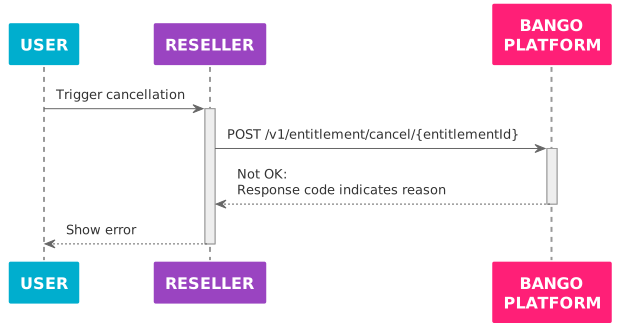
Skeleton code
Here’s some sample code in a C/Java-like language: adapt this code to your needs. Use the same API endpoint prefix with test credentials and with production credentials.FAQ
Which request parameters should I set?
Which request parameters should I set?
You must pass the entitlement ID in the path of the request URL.In the request body, you should set the
cancelReasonCategory, cancelReasonCode, and cancelReasonDescription parameters. You can also include any other parameters, with any names and values you like.The cancelReasonCategory, cancelReasonCode, cancelReasonDescription, and custom properties are added to the entitlement’s extensionData property.See Bango Resale / For resellers / Reseller API reference / Reseller API reference overview for detailed information on all request parameters, and Bango Resale / For resellers / Reseller API reference / Standard reasons for suspend, cancel, revoke, and terminate for the values to use for cancelReasonCategory and cancelReasonCode.What are all the possible API response structures?
What are all the possible API response structures?
All responses contain a
responseCode string that indicates the result of the request. Use this code to determine how to react. For each distinct responseCode, the response might include other useful values.See Bango Resale / For resellers / Reseller API reference / Reseller API reference overview for detailed information on all responses.