

POST request to the Bango Resale API.
As part of the API request, you supply:
- The unique, persistent identifer for the user. This is an ID you maintain: the Bango Platform treats it as opaque.
- Merchant and product identifiers, and (depending on the merchant) an offer identifier, which together identify the service you want to activate for the user. Bango maintains these identifiers, and ensures you can only create entitlements for authorized services.
- A notification URL. The Bango Platform POSTs asynchronous entitlement updates to this URL. See Bango Resale / For resellers / Reseller API reference / Notifications from Bango.
- Optionally, other parameters including custom data. See Bango Resale / For resellers / Reseller API reference / Reseller API reference overview.
- A response code, indicating the result of the request. Use this code to determine what to do next.
- For HTTP 200 responses, the entitlement record, including any custom data you’ve supplied.
ACTIVE and the user can access the service immediately. For others, the status is PENDING, which means the merchant won’t activate the service until a process is complete. This process might include actions by the user: for example, registering for the service. In this case the response code indicates what your code should do (for example, send the user to a web page), and the response contains any extra data required (for example, a registration URL).
Sequence diagrams
Immediate service activation
Immediate service activation
The Bango Platform activates the service for the user immediately, returning an entitlement with status 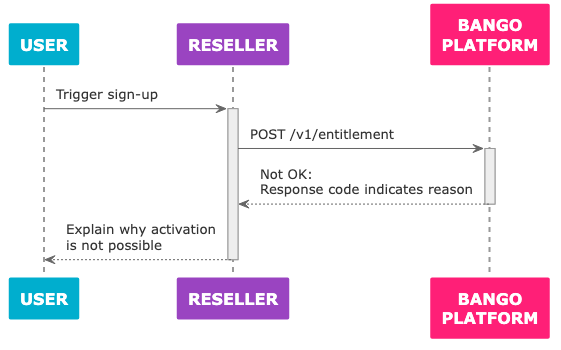
ACTIVE.Service activation after user completes merchant process
Service activation after user completes merchant process
The merchant requires the user to perform a process such as registration. The Bango Platform returns an entitlement with status
PENDING, with the response code CLIENT_ACTION_REQUIRED and action NAVIGATE_TO_URL, together with the target URL. You send the user to the URL, and when the user completes the process the Bango Platform notifies you by direct server-to-server communication.Failed request for service activation
Failed request for service activation
The Bango Platform can’t activate the service for the user, and returns the reason in the response to the API request.
Skeleton code
Here’s some sample code in a C/Java-like language: adapt this code to your needs. Use the same API endpoint prefix with test credentials and with production credentials. Some functions referenced in the skeleton code, such asredirect_device_to, are not defined. You need to implement these where possible.
FAQ
Which request parameters should I set?
Which request parameters should I set?
You must set the
customerIdentifier, merchantAccountKey, and productKey parameters, to identify the merchant service and the user.Some merchants may also require you to set the offerKey parameter.Bango recommends you set the notificationUrl to receive asynchronous notifications from the Bango Platform.See Bango Resale / For resellers / Reseller API reference / Reseller API reference overview for detailed information on all request parameters.What value should I use for customerIdentifier?
What value should I use for customerIdentifier?
Use your own system’s unique identifier for the user. The Bango Platform treats this as an opaque string.
What values should I use for merchantAccountKey, productKey, and offerKey?
What values should I use for merchantAccountKey, productKey, and offerKey?
The
merchantAccountKey and productKey parameters, and (depending on the merchant) the offerKey parameter, together identify the service you want to allow the user to access.Bango maintains the allowed values for these keys. When you have an agreement with a merchant to resell a service, Bango will let you know which values to use. The Bango Platform ensures you can only create entitlements for authorized services.For testing, use special values for these keys. See Bango Resale / For resellers / Testing.What are all the possible API response structures?
What are all the possible API response structures?
All responses contain a
responseCode string that indicates the result of the request. Use this code to determine how to react. For each distinct responseCode, the response might include other useful values.See Bango Resale / For resellers / Reseller API reference / Reseller API reference overview for detailed information on all responses.